Os Configuration
What You Will Do
Os decides what runs and when. In this chapter you create its containers by hand in the ECU Configuration editor: the settings of the operating system as a whole, the application mode and resource that EcuM names, one counter, four tasks and three alarms that activate the periodic tasks.
Before You Begin
- Start after finishing PRTE Setup.
- Click Configuration under MODULE to open the ECU Configuration editor.
- + at the right end of a row in the CONFIGURATION tree adds a container of that definition, with its default values, and selects it. Change only the values in the table. Type a number and press
Tab; pick a reference from its list. - A bold name in the Container column is not the name + gives. Type it in Name in the panel and press
Tab.
| Container | + on | Values |
|---|---|---|
OsOS | OsOS | OsStatus EXTENDED, OsStackMonitoring TRUE, OsUseGetServiceId TRUE, OsUseParameterAccess TRUE |
OsOS/OsHooks | OsHooks | OsErrorHook, OsPostTaskHook, OsPreTaskHook, OsShutdownHook, OsStartupHook all FALSE |
OSDEFAULTAPPMODE | OsAppMode | None |
RES_AUTOSAR_ECUM | OsResource | OsResourceProperty STANDARD |
OsCounter_0 | OsCounter | OsCounterMaxAllowedValue 1000000, OsCounterMinCycle 1, OsCounterTicksPerBase 1, OsCounterType HARDWARE, OsSecondsPerTick 0.01 |
OsTask_0 | OsTask | OsTaskActivation 1, OsTaskPeriod 0.01, OsTaskPriority 2, OsTaskSchedule FULL, OsTaskStackSize 32768 |
OsTask_EcuMStartup | OsTask | OsTaskActivation 1, OsTaskPriority 3, OsTaskSchedule FULL, OsTaskStackSize 32768 |
OsTask_EcuMStartup/OsTaskAutostart | OsTaskAutostart | OsTaskAppModeRef Os/OSDEFAULTAPPMODE |
OsTask_2 | OsTask | OsTaskActivation 1, OsTaskPeriod 0.02, OsTaskPriority 1, OsTaskSchedule FULL, OsTaskStackSize 32768 |
OsTask_3 | OsTask | OsTaskActivation 1, OsTaskPeriod 0.01, OsTaskPriority 1, OsTaskSchedule FULL, OsTaskStackSize 32768 |
OsAlarm_0 | OsAlarm | OsAlarmCounterRef Os/OsCounter_0 |
OsAlarm_0/OsAlarmAction | OsAlarmAction | None |
OsAlarm_0/OsAlarmAction/OsAlarmActivateTask | OsAlarmActivateTask | OsAlarmActivateTaskRef Os/OsTask_0 |
OsAlarm_1 | OsAlarm | OsAlarmCounterRef Os/OsCounter_0 |
OsAlarm_1/OsAlarmAction | OsAlarmAction | None |
OsAlarm_1/OsAlarmAction/OsAlarmActivateTask | OsAlarmActivateTask | OsAlarmActivateTaskRef Os/OsTask_2 |
OsAlarm_2 | OsAlarm | OsAlarmCounterRef Os/OsCounter_0 |
OsAlarm_2/OsAlarmAction | OsAlarmAction | None |
OsAlarm_2/OsAlarmAction/OsAlarmActivateTask | OsAlarmActivateTask | OsAlarmActivateTaskRef Os/OsTask_3 |
Setting Up the Operating System
-
Click
Osin the list. The CONFIGURATION tree lists the container definitions ofOs, all empty. Click + on theOsOSrow. The editor addsOsOSand selects it.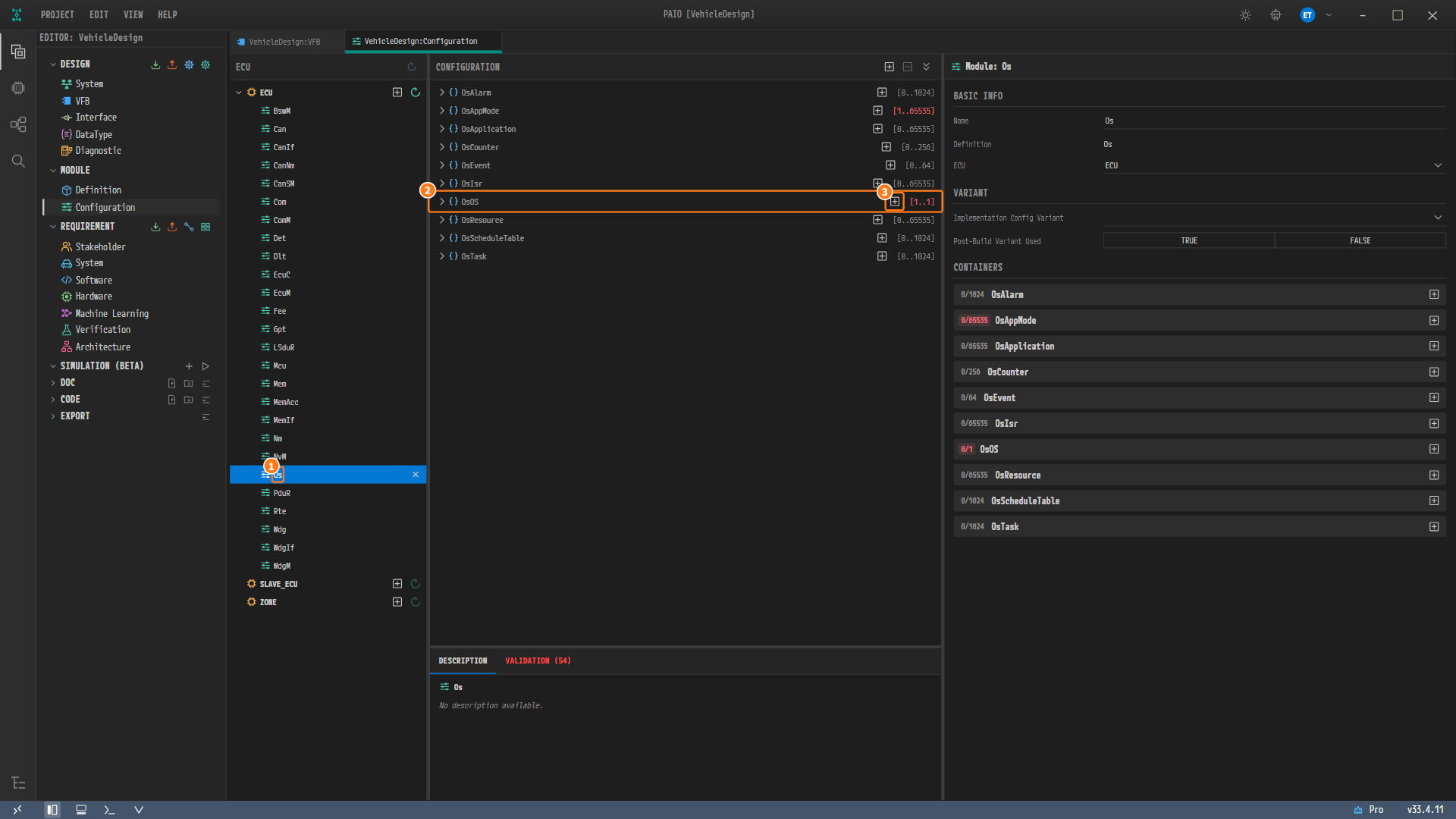
Figure 7-1. ①
Os, ② theOsOSrow, ③ +. -
In the panel on the right, choose
EXTENDEDfor OsStatus. Click TRUE for OsStackMonitoring, OsUseGetServiceId and OsUseParameterAccess.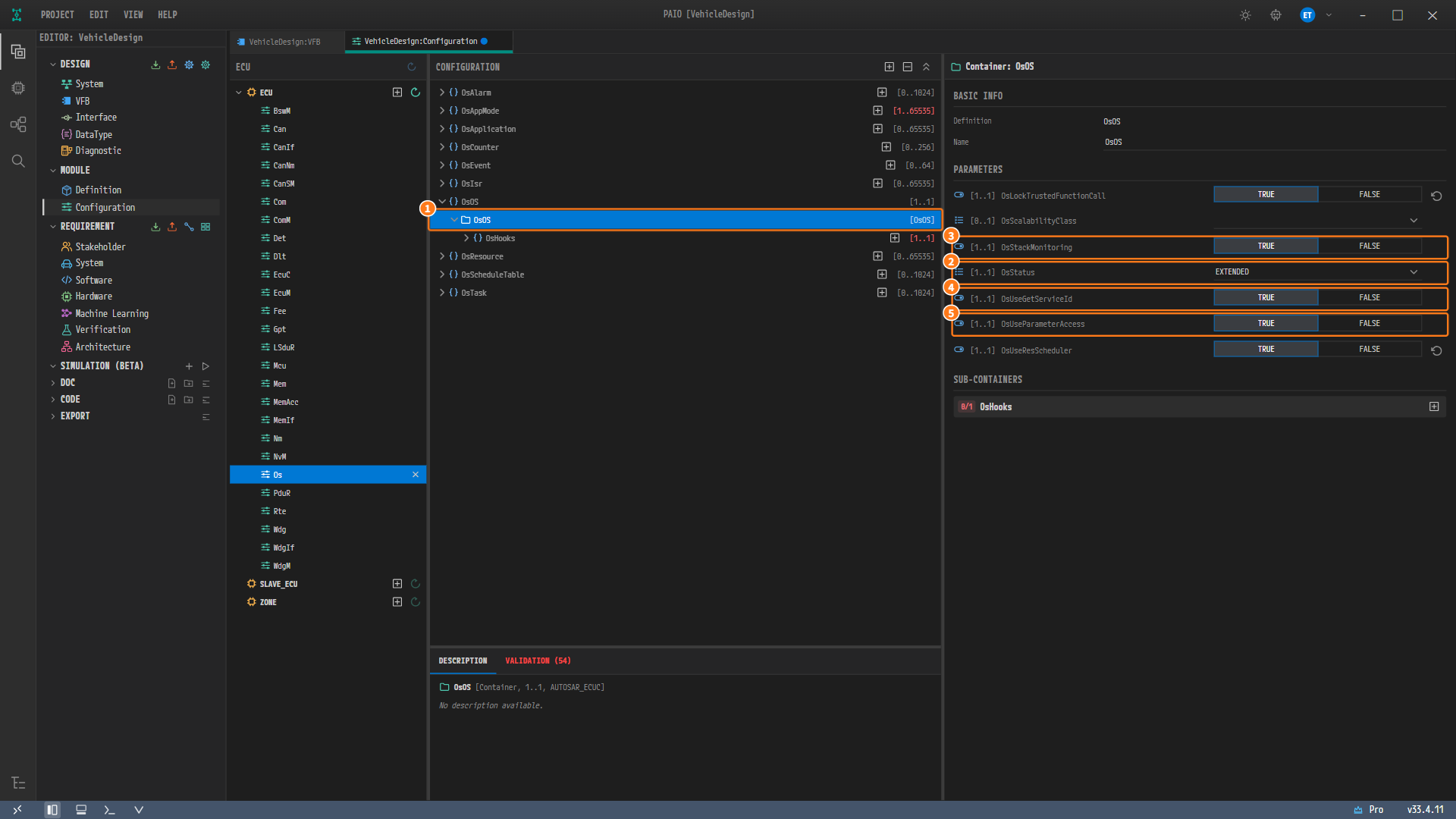
Figure 7-2. ①
OsOS, ② OsStatus, ③ OsStackMonitoring, ④ OsUseGetServiceId, ⑤ OsUseParameterAccess. -
Under
OsOS, click + on theOsHooksrow and click FALSE for the five hooks. -
Click + on the
OsAppModerow. In Name, replace the given name withOSDEFAULTAPPMODEand pressTab. -
Click + on the
OsResourcerow. Rename it toRES_AUTOSAR_ECUMthe same way and chooseSTANDARDfor OsResourceProperty.The two names must be exact: the
EcuMconfiguration you entered in PRTE Setup refers to them. -
Click + on the
OsCounterrow and enter the values ofOsCounter_0from the table.
Creating the Tasks
-
Click + on the
OsTaskrow. The editor addsOsTask_0and selects it.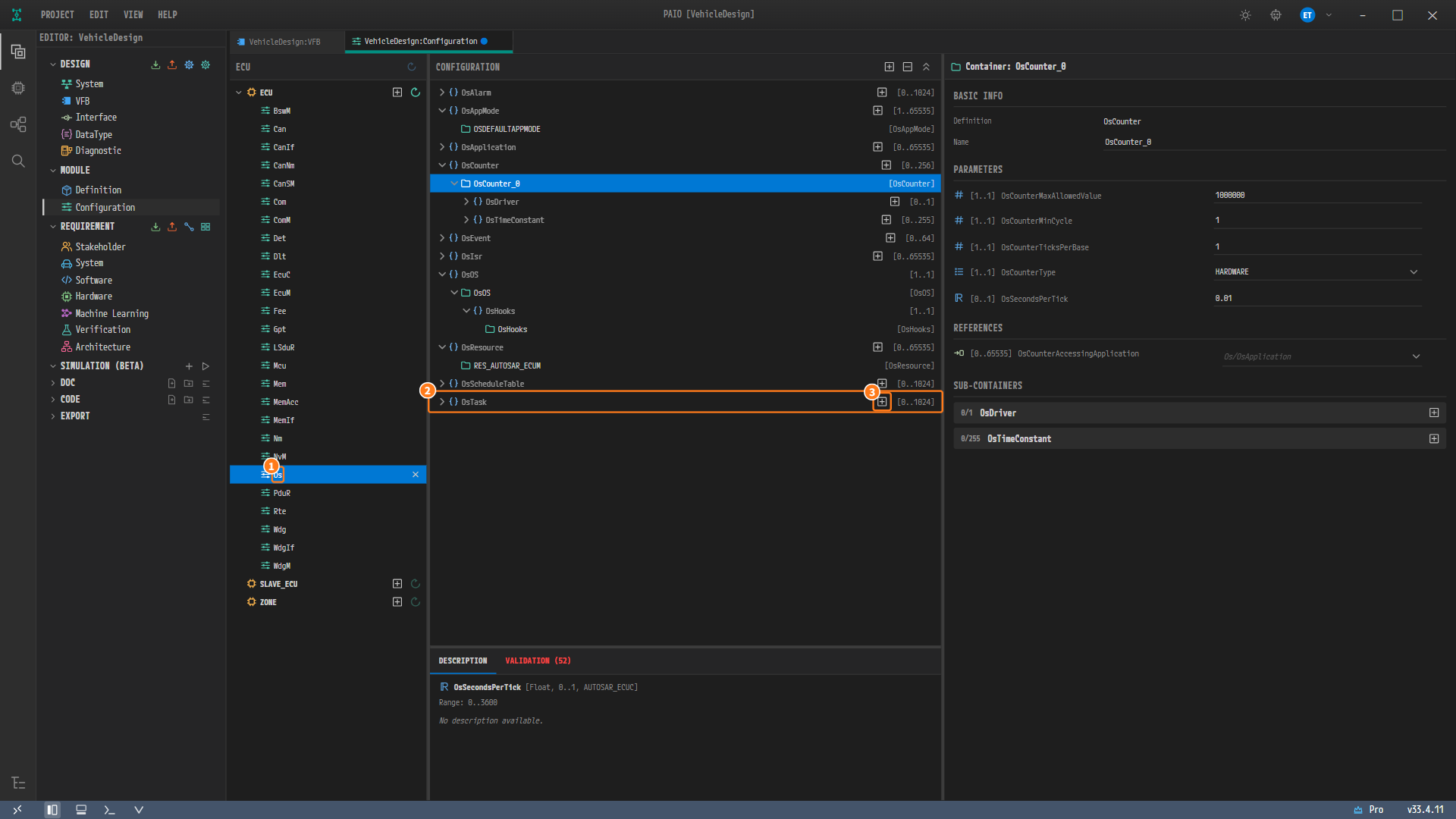
Figure 7-3. ①
Os, ② theOsTaskrow, ③ +. -
Enter the values of
OsTask_0from the table.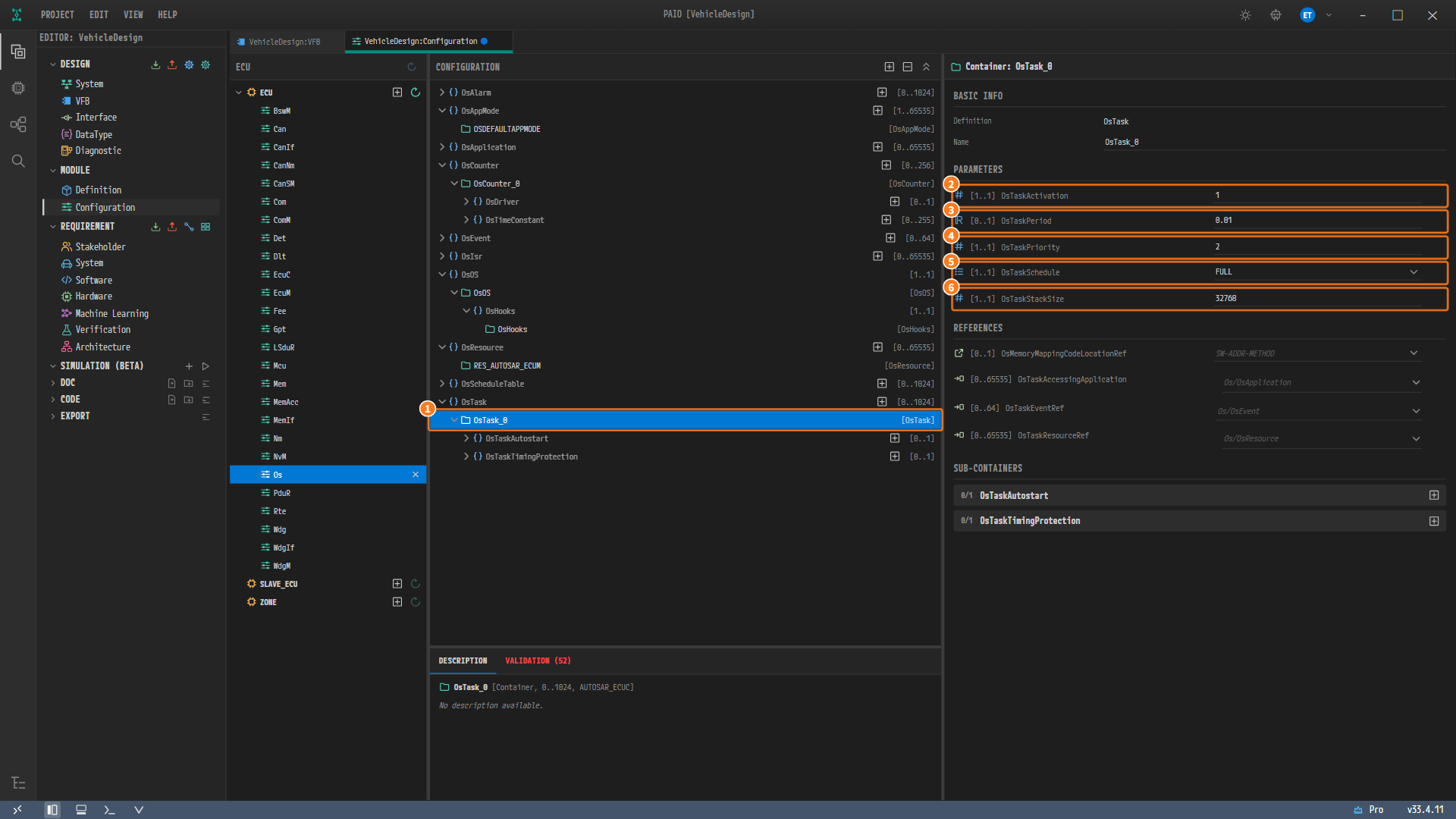
Figure 7-4. ①
OsTask_0, ② OsTaskActivation, ③ OsTaskPeriod, ④ OsTaskPriority, ⑤ OsTaskSchedule, ⑥ OsTaskStackSize. -
Click + on the
OsTaskrow again. The editor addsOsTask_1. In Name, replace it withOsTask_EcuMStartupand pressTab. Enter its values from the table and leave OsTaskPeriod empty.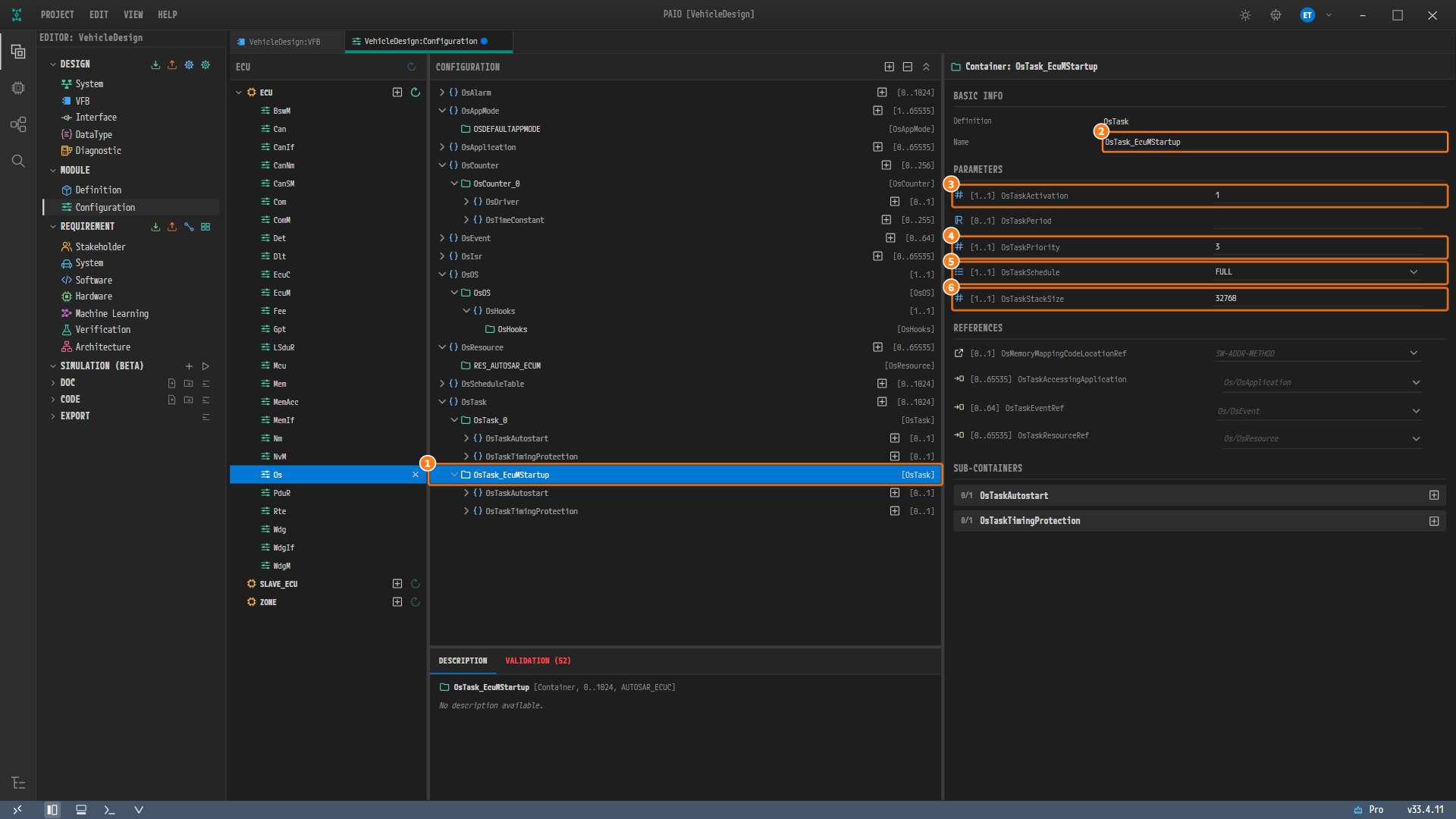
Figure 7-5. ①
OsTask_EcuMStartup, ② Name, ③ OsTaskActivation, ④ OsTaskPriority, ⑤ OsTaskSchedule, ⑥ OsTaskStackSize. -
Under
OsTask_EcuMStartup, click + on theOsTaskAutostartrow. In the newOsTaskAutostart, pickOs/OSDEFAULTAPPMODEfor OsTaskAppModeRef.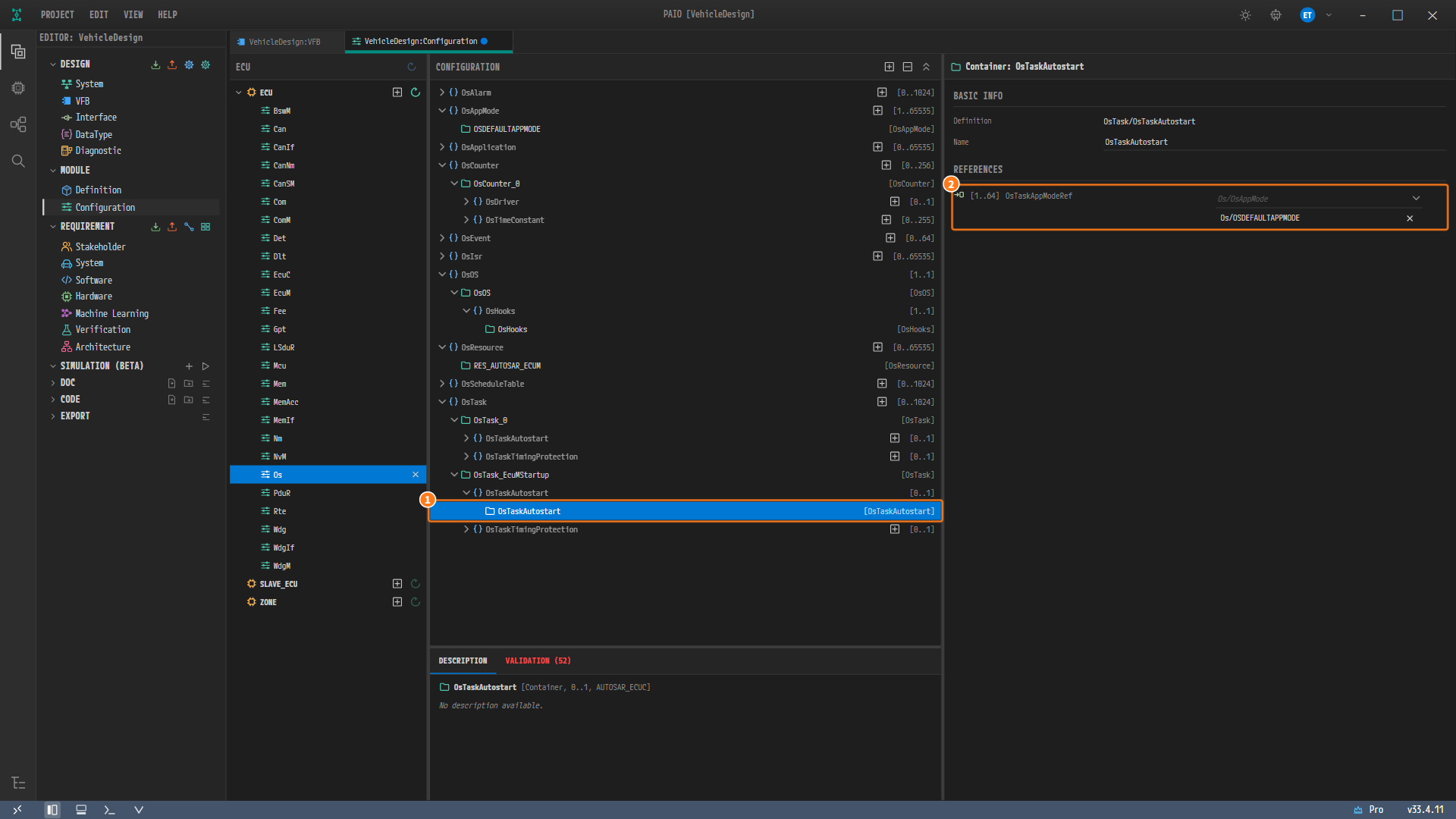
Figure 7-6. ①
OsTaskAutostart, ② OsTaskAppModeRef. -
Click + on the
OsTaskrow again. The editor names the new taskOsTask_1again, because that number is free. Rename it toOsTask_2and enter its values from the table. -
Create
OsTask_3the same way: + givesOsTask_1, which you rename toOsTask_3.
Creating the Alarms
-
Click + on the
OsAlarmrow. In the newOsAlarm_0, pickOs/OsCounter_0for OsAlarmCounterRef.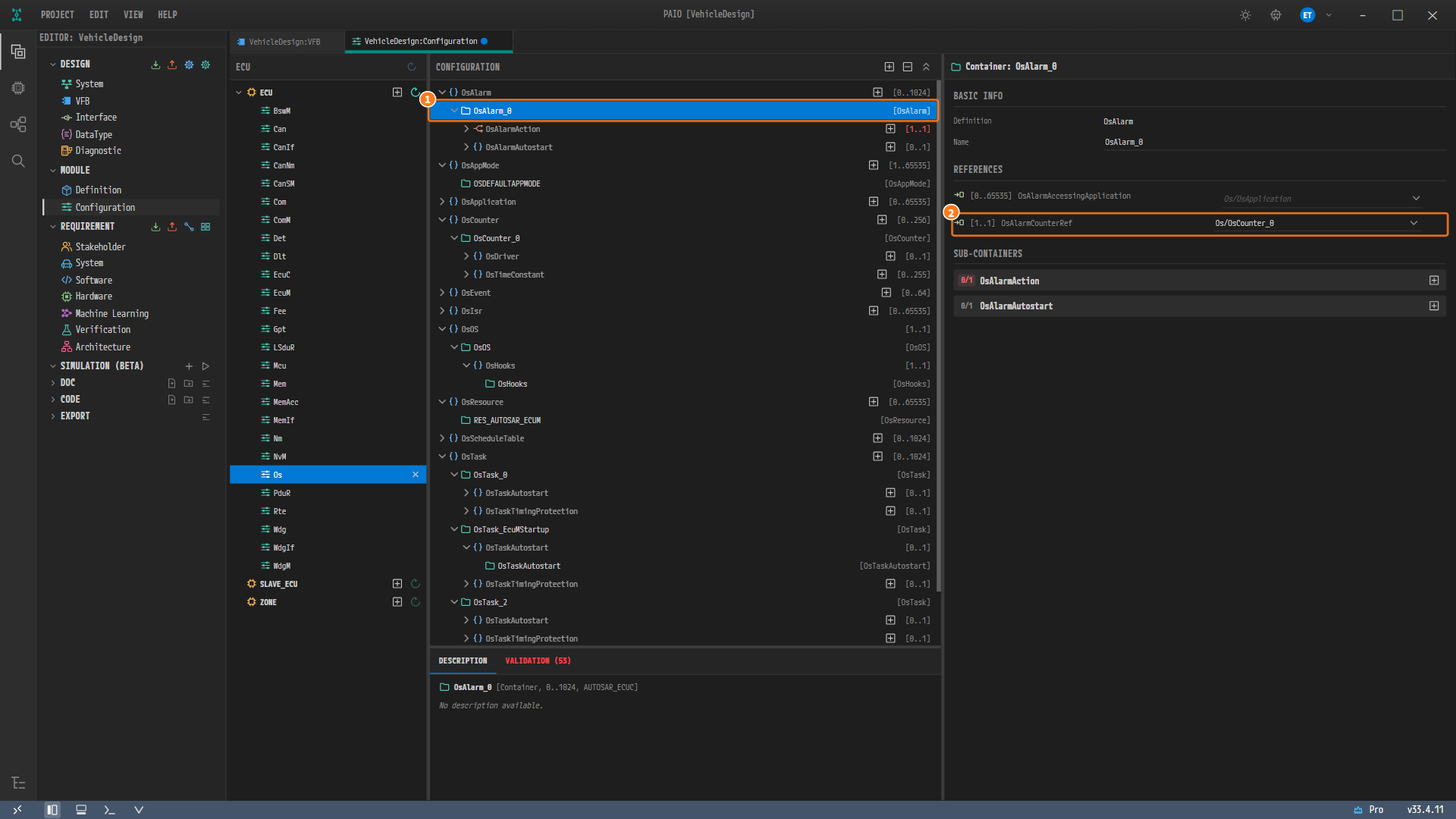
Figure 7-7. ①
OsAlarm_0, ② OsAlarmCounterRef. -
Under
OsAlarm_0, click + on theOsAlarmActionrow. Under the newOsAlarmAction, click + on theOsAlarmActivateTaskrow.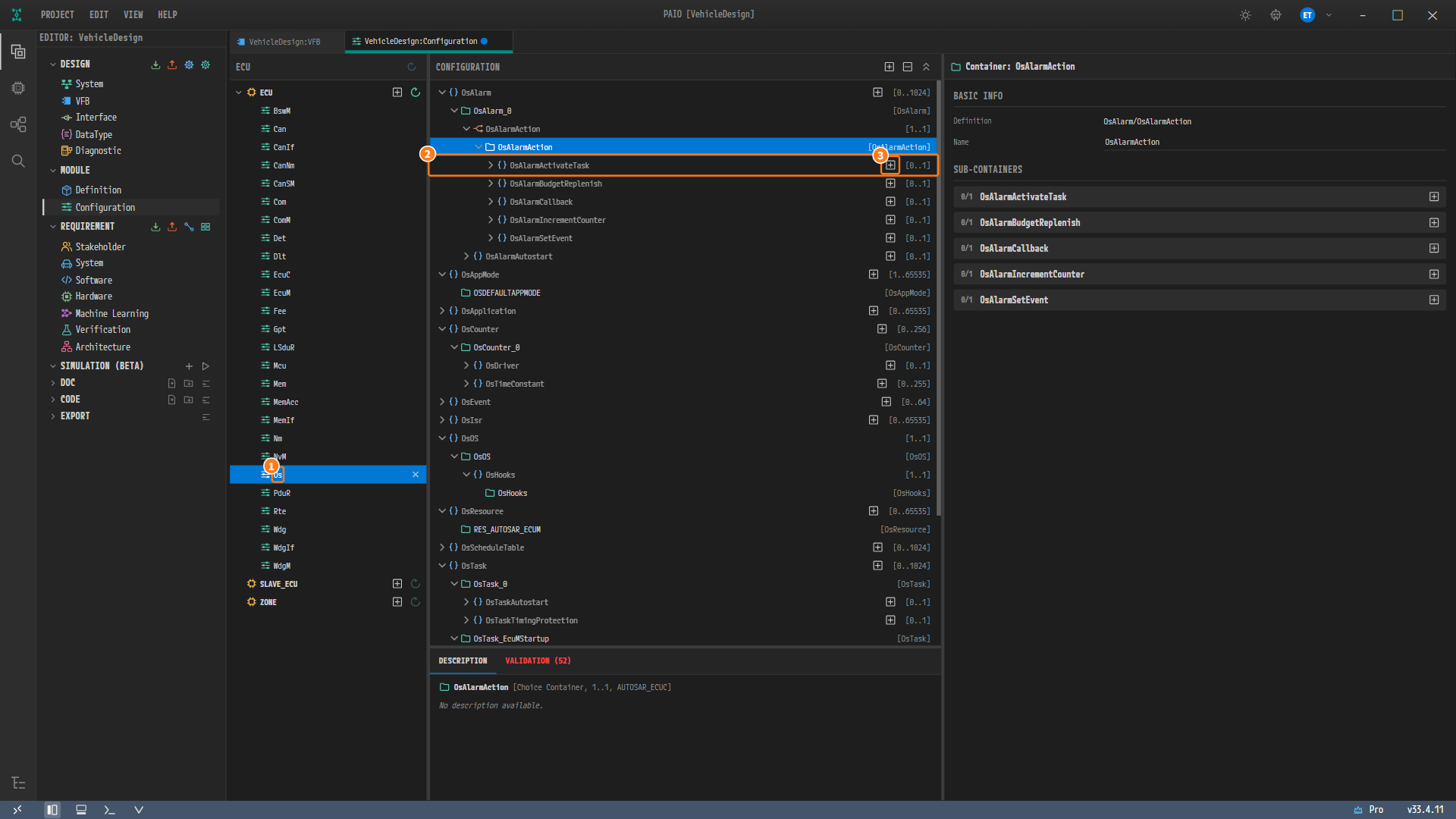
Figure 7-8. ①
Os, ② theOsAlarmActivateTaskrow underOsAlarm_0/OsAlarmAction, ③ +. -
In the new
OsAlarmActivateTask, pickOs/OsTask_0for OsAlarmActivateTaskRef.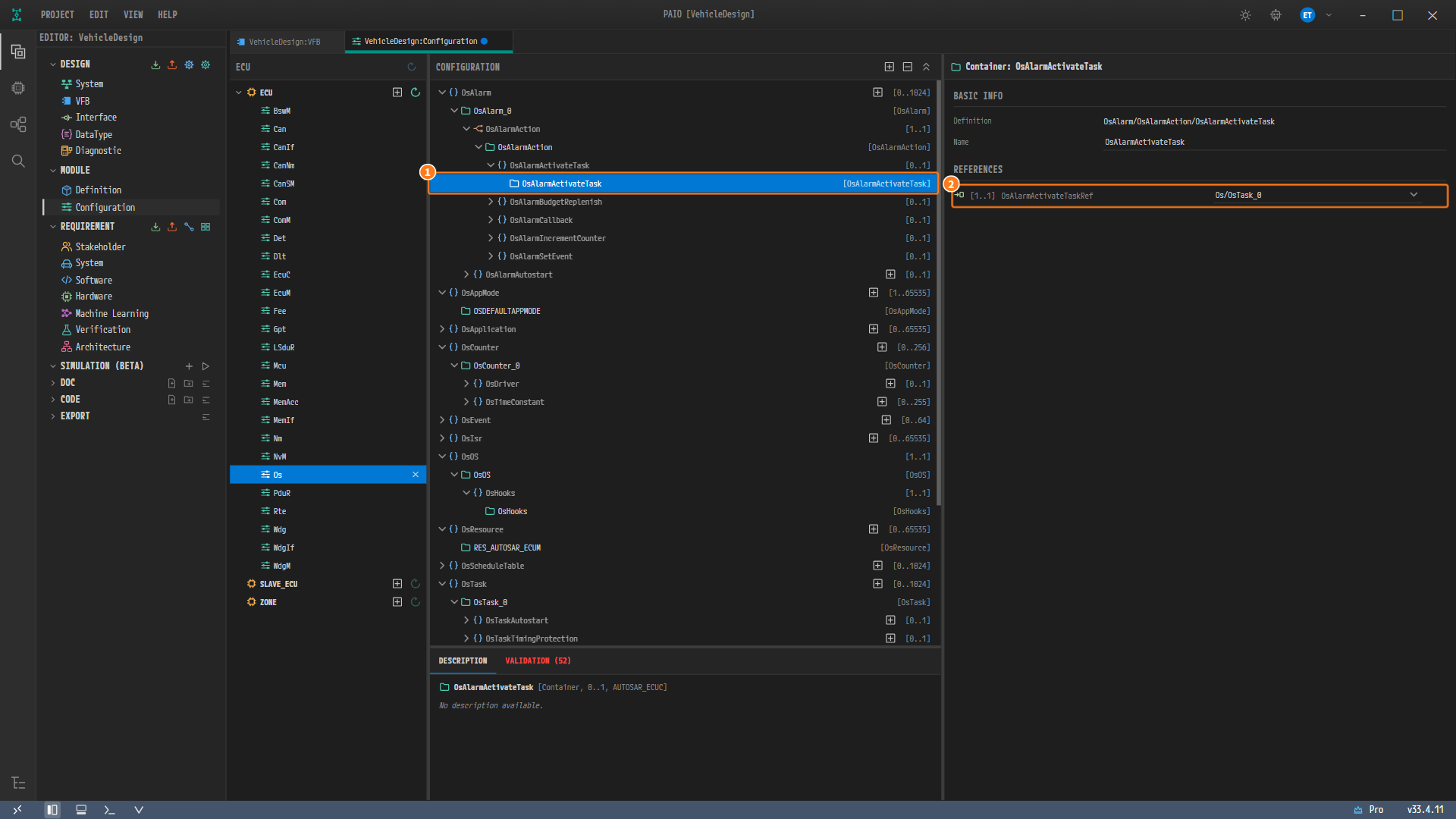
Figure 7-9. ①
OsAlarmActivateTask, ② OsAlarmActivateTaskRef. -
Create
OsAlarm_1andOsAlarm_2the same way from the table.OsAlarm_1activatesOsTask_2, andOsAlarm_2activatesOsTask_3. -
Save with
Ctrl+S.
Why Is It Designed This Way?
- Fixed names. The
EcuMof PRTE Setup namesOSDEFAULTAPPMODEandRES_AUTOSAR_ECUM. PAIO writes the start-up task sourcesrc/EcuM_StartupTask.conly for a task namedOsTask_EcuMStartup. - One task per timing.
OsTask_0runs the BSW main functions every 10 ms,OsTask_2the sensor runnable every 20 ms, andOsTask_3the actuator runnables and the BswM poll. Chapter 8 maps the events to these tasks and alarms. - The start-up task.
OsTask_EcuMStartuphas no period. OsTaskAutostart starts it once inOSDEFAULTAPPMODE, and its priority3is the highest. - One counter.
OsCounter_0ticks every 0.01 s and drives all three alarms. - EXTENDED. The extended status makes the OS services report errors, which helps during development.
Checklist
- The CONFIGURATION tree of
OsholdsOsOS,OSDEFAULTAPPMODE,RES_AUTOSAR_ECUMandOsCounter_0. - It holds the four tasks
OsTask_0,OsTask_EcuMStartup,OsTask_2andOsTask_3. -
OsAlarm_0,OsAlarm_1andOsAlarm_2activateOsTask_0,OsTask_2andOsTask_3. - The tab
VehicleDesign:Configurationcarries no modified mark.
Next Step
In Rte Configuration you map the runnables and BSW main functions to these tasks.