PRTE Setup
What You Will Do
In this chapter you prepare the ECU's BSW configuration (ECUC) in three steps.
- In the VFB ECU Configuration window, bring in the BSW modules with PRTE Platform Import, the network management modules
CanNmandNmincluded. This creates the module definitions and one empty configuration per module. - In the ECU Configuration editor, set the start-up and hardware values of
EcuM,BswM,McuandDetby hand. The design does not decide them; they are this ECU's own values. - Import the Rte values file. It carries the six
Rtereferences the property panel does not offer yet.
Caution. This tutorial does not use PRTE AUTO CONFIGURATION. You configure the BSW by hand in the ECU Configuration editor, module by module, so that you see and decide every value. Do not click PRTE AUTO CONFIGURATION, the PRTE Auto Configuration icon of the ECU Configuration editor or Auto-Generate, and do not apply the ECU Configuration window. They write BSW values from the design and would overwrite what you enter.
Before You Begin
- Start after finishing Internal Behavior.
- Save the file VehicleDesign_Rte.arxml to your computer.
Caution. The file holds values for an ECU named
ECU, the nodeECUof the AUTOSAR System Tutorial. Do not rename the node.
| Where | Item | Value |
|---|---|---|
| PRTE Platform Import window | Module map | The suggested selection, plus CanNm and Nm |
| ECU Configuration [ECU] window | Close with Esc | |
| ECU Configuration editor | EcuM, BswM, Mcu, Det | The tables below |
| Conflict Resolution window | Module Definition | All → Use Imported |
Importing the BSW Modules
-
In the tab
VehicleDesign:VFB, go inside the compositionECU. Click the ECU icon at the top right of the frame to open the ECU Configuration [ECU] window. Click PRTE Platform Import at its top right. Do not click PRTE AUTO CONFIGURATION next to it.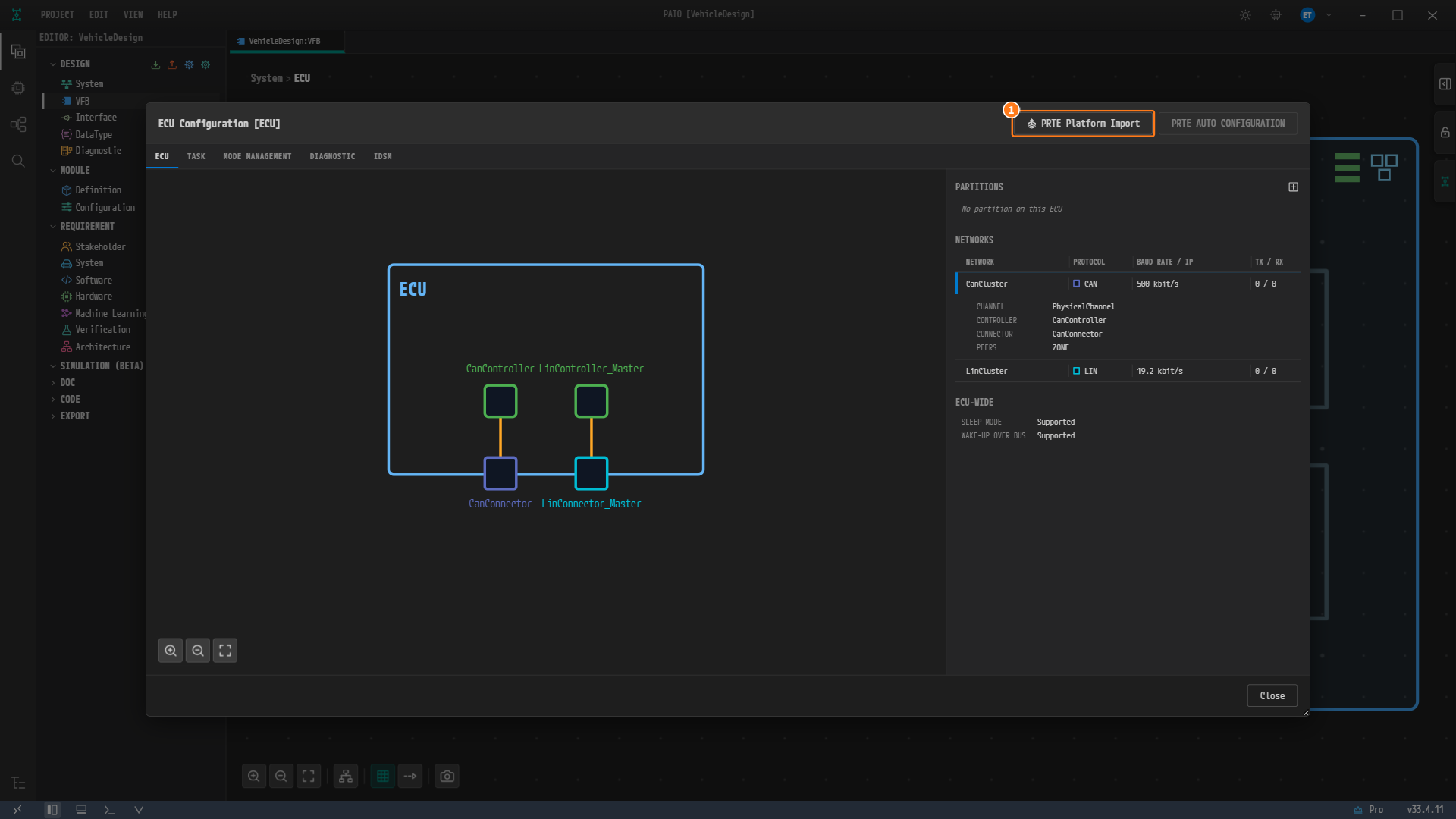
Figure 6-1. ① PRTE Platform Import.
-
The PRTE Platform Import window shows a map of the BSW modules. The bright ones are selected already, from the design. The CAN stack is selected:
Can,CanIf,LSduR,CanSM,ComM,ComandPduR. The network management modulesCanNmandNmare not. ClickCanNm:Nmis selected with it, and the line at the bottom readsSelected CanNm, Nm.Leave the rest as it is and click Import.Nmis the module AUTOSAR calls the Network Management Interface (NmIf); PRTE names itNm.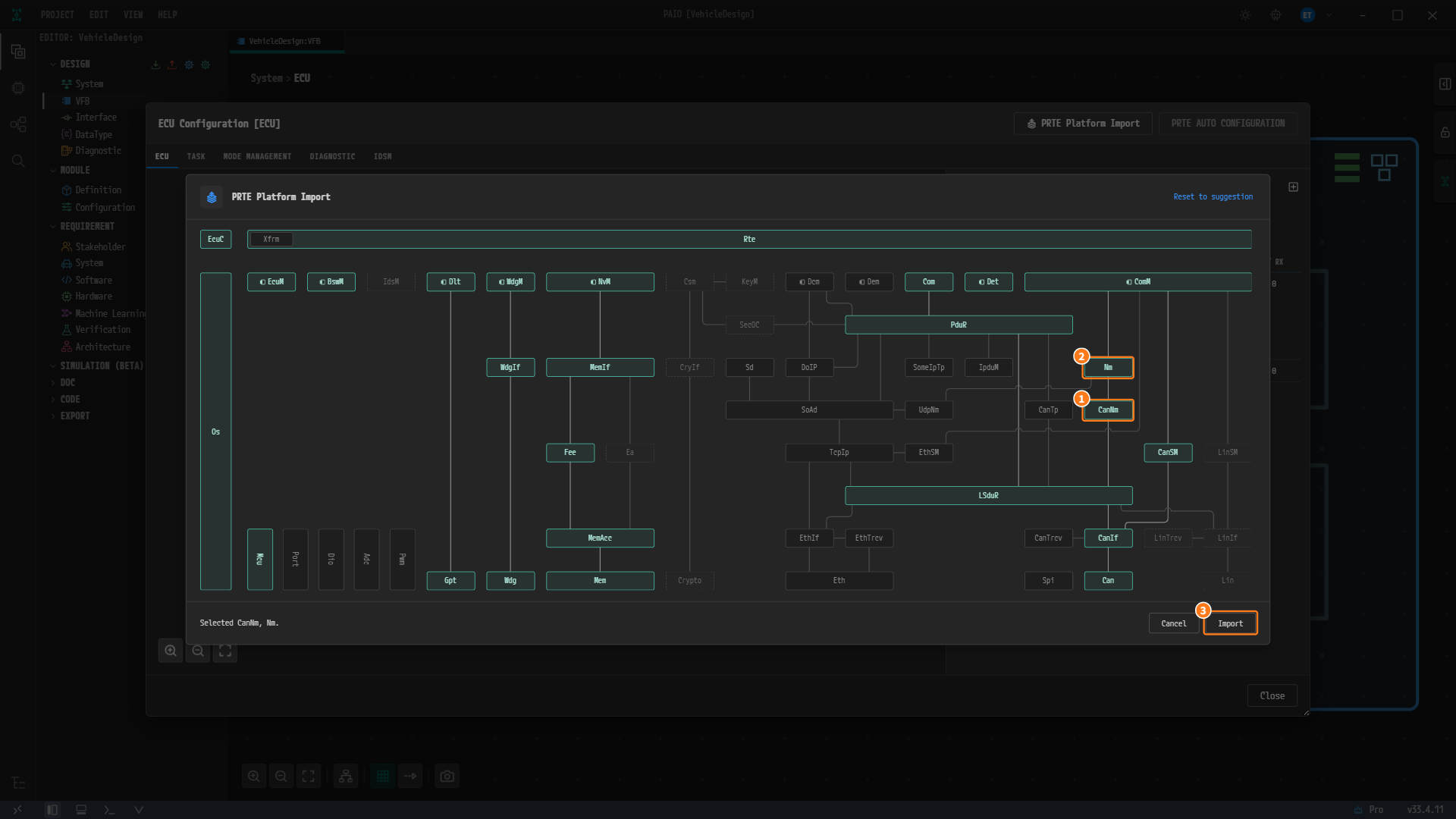
Figure 6-2. ①
CanNm, ②Nm, ③ Import.Wait until the progress reaches
Complete. -
Press
Escto close the ECU Configuration window. Do not pressCtrl+Sin this window: there it applies the window. Closing withEscwrites nothing.
Note. The import also adds the composition
PRTE_ECUwith the BSW service components to the frame, and the interfaces and data types of the BSW modules, so the Interface and DataType editors now list many entries you did not create. SelectingCanNmandNmadds only their definitions and empty configurations, no service component.
Opening the ECU Configuration Editor
Click Configuration under MODULE. The ECU Configuration editor opens. The ECU list on the left shows the ECUs. The imported modules are under ECU. Their configurations are empty, except that Rte holds the SW-C pairs of the import.
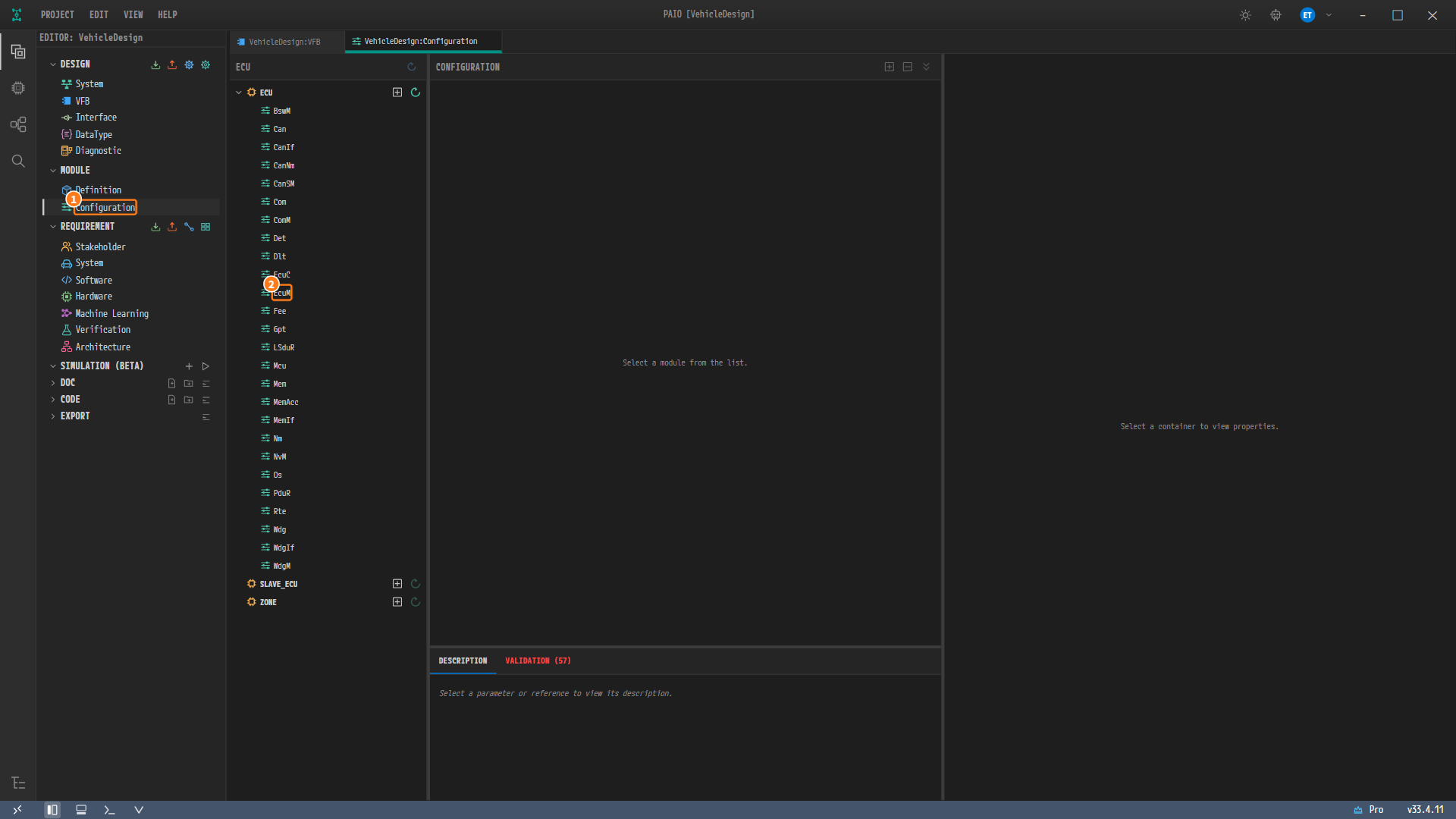
Figure 6-3. ① Configuration, ② EcuM, one of the modules of ECU.
At the right end of each ECU row are two icons, Add Module and PRTE Auto Configuration (the circular arrow). Do not click PRTE Auto Configuration.
The editor works the same way in every module of this chapter and of the chapters after it:
- + at the right end of a row in the CONFIGURATION tree adds a container of that definition, with its default values, and selects it. Change only the values in the table. Type a number and press
Tab; pick a reference from its list. - A bold name in the Container column is not the name + gives. Type it in Name in the panel and press
Tab. - A reference whose target does not exist yet is not in its list. Type the path shown in the table and press
Tab. Until the target exists the path is shown in yellow; a field that takes a list of references also adds(unresolved)to it.
Setting Up EcuM
-
Click
EcuMin the list. The CONFIGURATION tree lists the container definitions ofEcuM, all empty. Click + on theEcuMGeneralrow. The editor addsEcuMGeneraland selects it.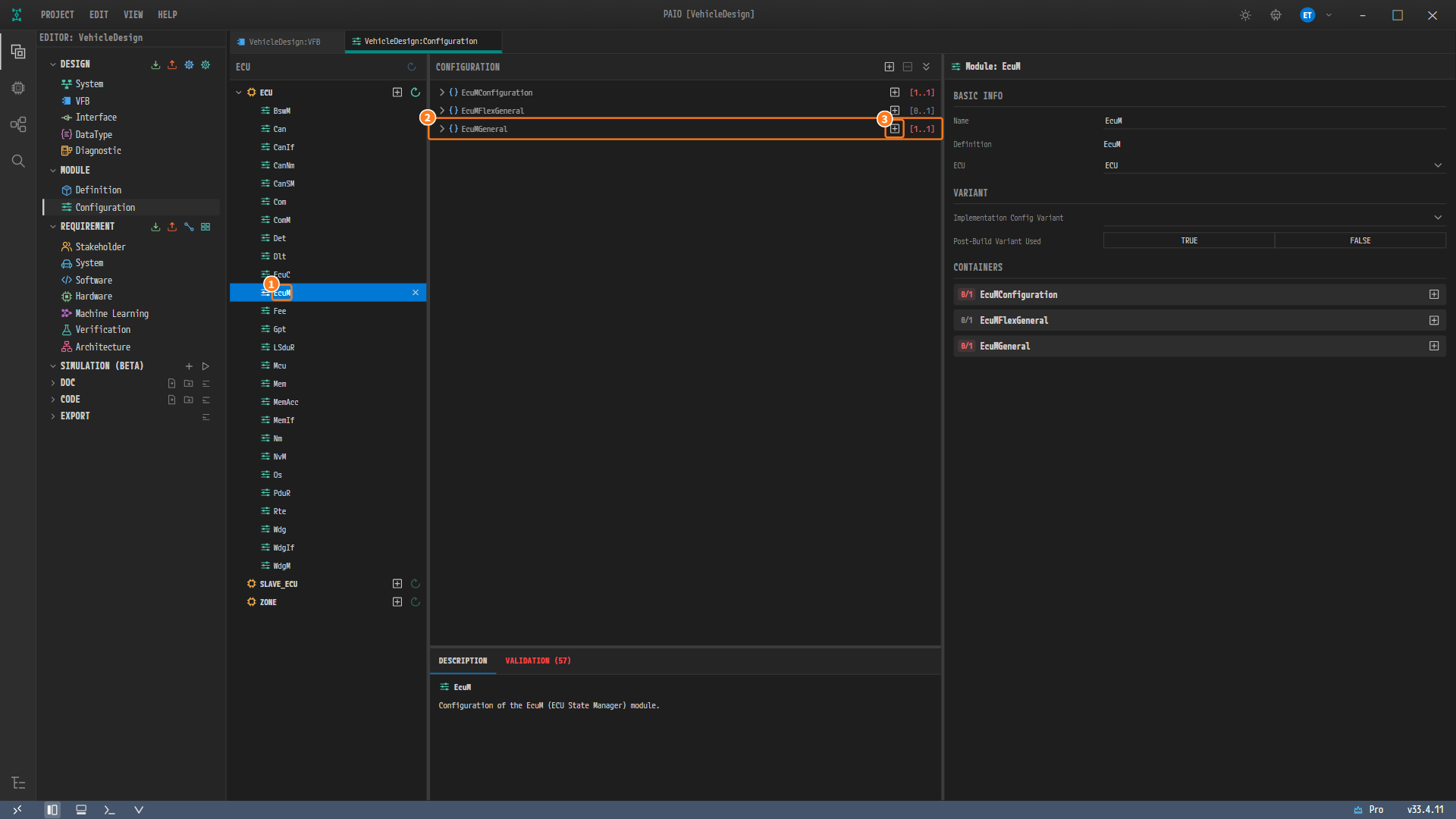
Figure 6-4. ①
EcuM, ② theEcuMGeneralrow, ③ +. -
In the panel on the right, click TRUE for EcuMDevErrorDetect and type
0.01in EcuMMainFunctionPeriod. Leave EcuMVersionInfoApi at FALSE.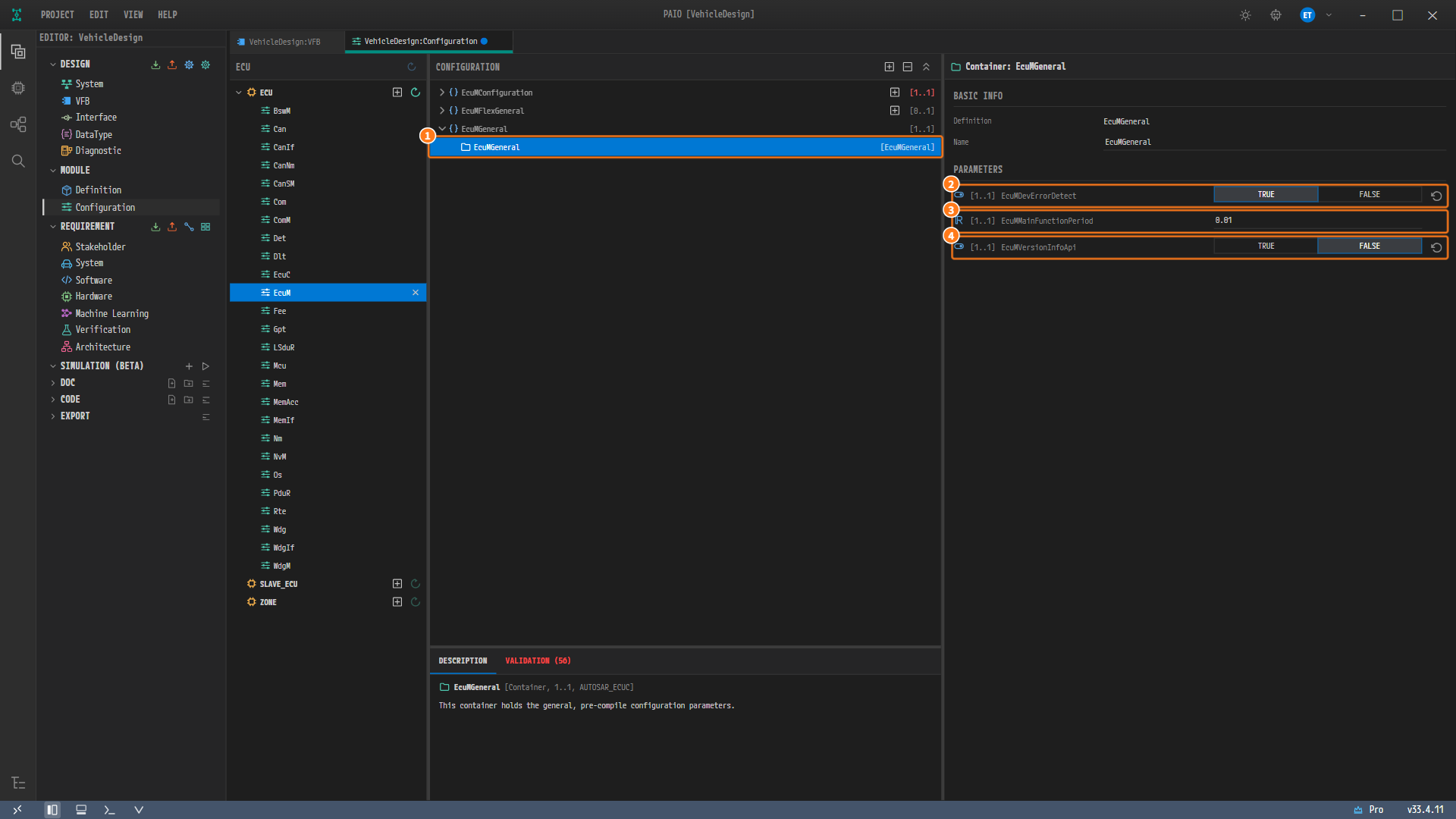
Figure 6-5. ①
EcuMGeneral, ② EcuMDevErrorDetect, ③ EcuMMainFunctionPeriod, ④ EcuMVersionInfoApi. -
Add
EcuMFlexGeneral,EcuMConfigurationand, under it,EcuMCommonConfigurationthe same way, each with its values from the table. InEcuMCommonConfiguration, typeOs/OSDEFAULTAPPMODEin EcuMDefaultAppMode andOs/RES_AUTOSAR_ECUMin EcuMOSResource. You create both in chapter 7, so both stay yellow until then, andOs/RES_AUTOSAR_ECUMcarries(unresolved).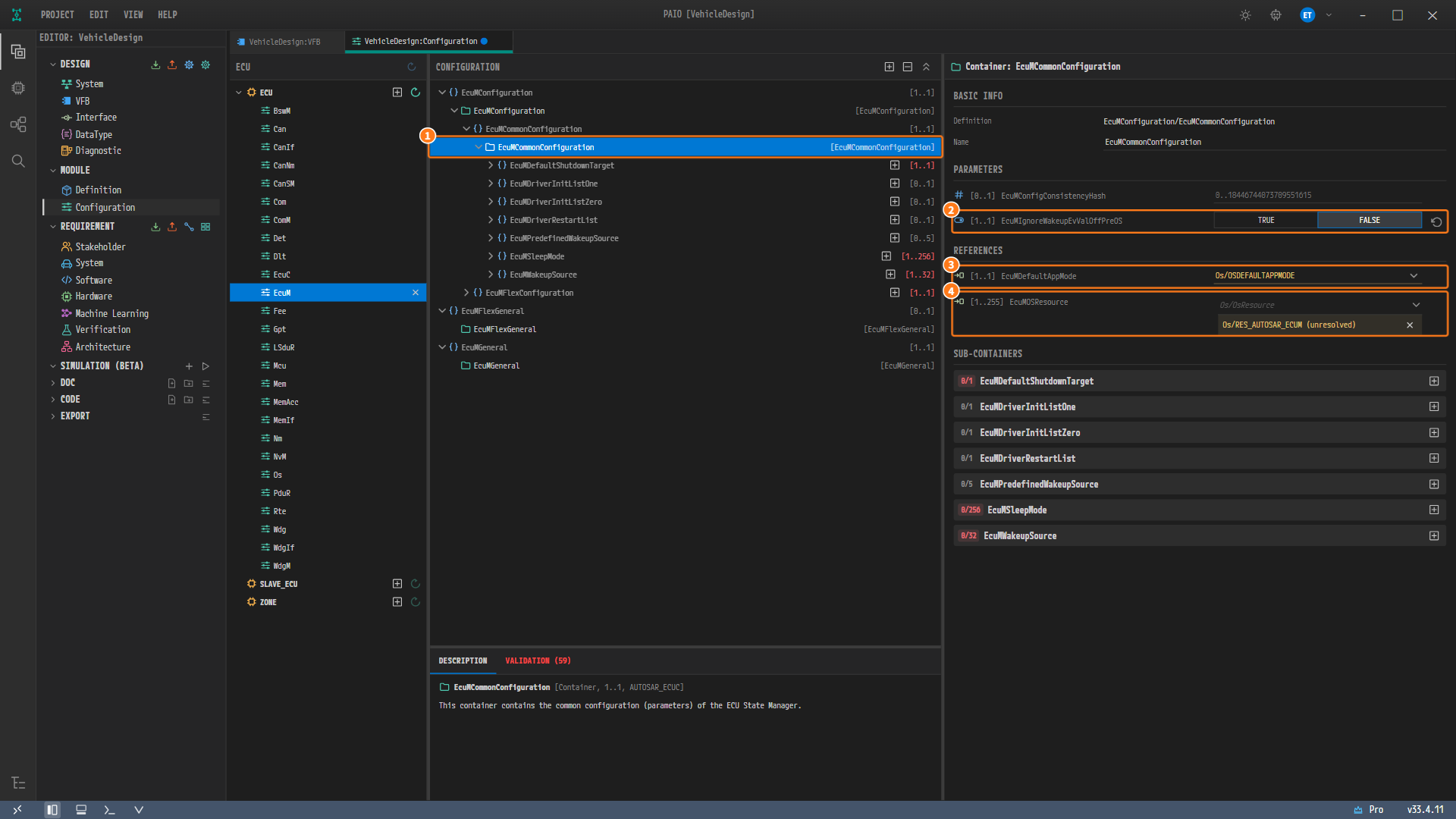
Figure 6-6. ①
EcuMCommonConfiguration, ② EcuMIgnoreWakeupEvValOffPreOS, ③ EcuMDefaultAppMode, ④ EcuMOSResource. -
Under
EcuMCommonConfiguration, addEcuMDriverInitListOne. Under it, click + on theEcuMDriverInitItemrow.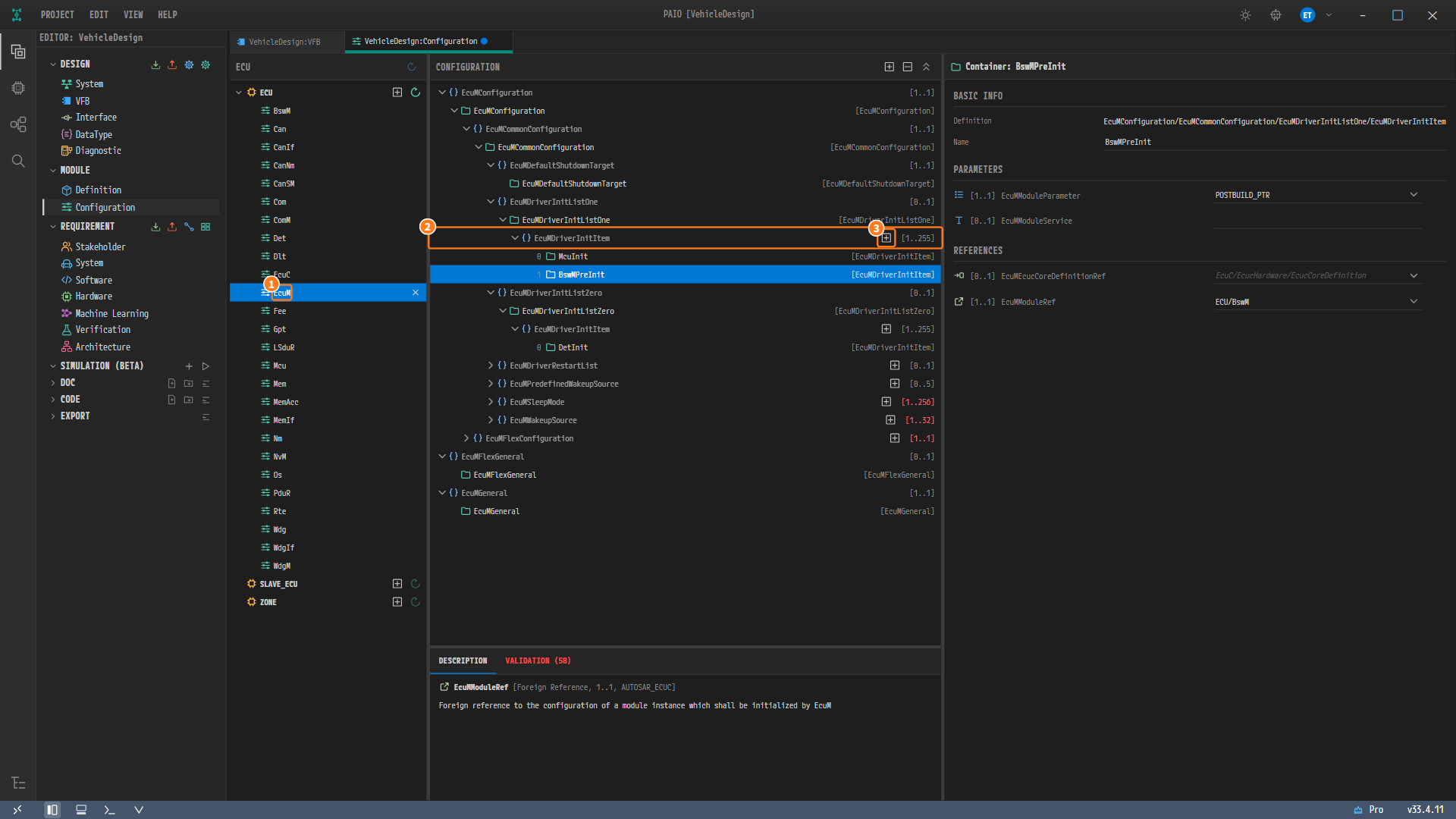
Figure 6-7. ①
EcuM, ② theEcuMDriverInitItemrow underEcuMDriverInitListOne, ③ +. -
The editor adds
EcuMDriverInitItem_0. In Name, replace it with the name in the table, choose the EcuMModuleParameter of the table (POSTBUILD_PTR, forNmInitNULL_PTR) and pick the module for EcuMModuleRef. Add the items in the order of the table: it is the order in whichEcuMinitializes the drivers.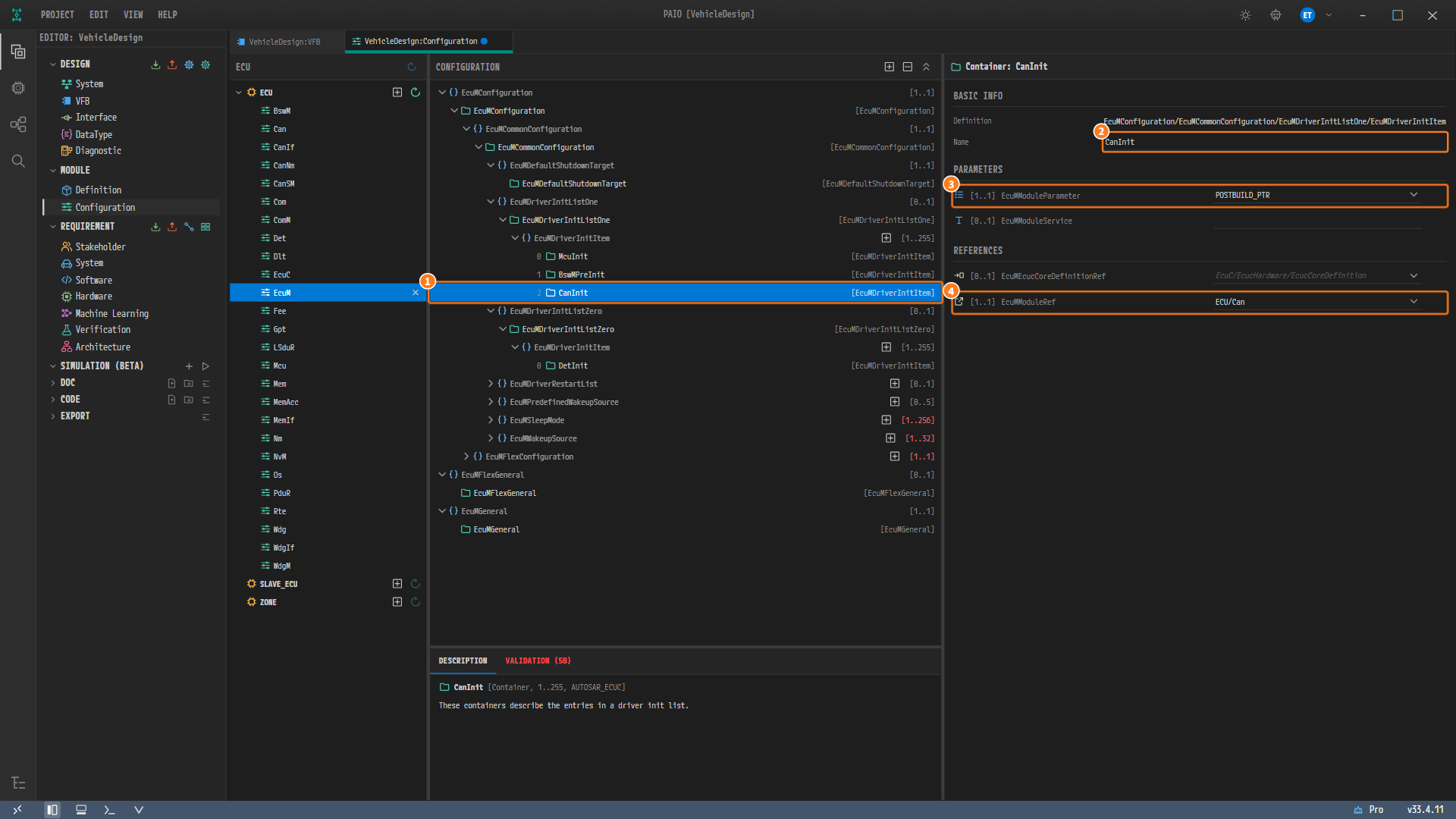
Figure 6-8. ①
CanInit, ② Name, ③ EcuMModuleParameter, ④ EcuMModuleRef. -
Add the remaining containers from the table and save with
Ctrl+S.
| Container | + on | Values |
|---|---|---|
EcuMGeneral | EcuMGeneral | EcuMDevErrorDetect TRUE, EcuMMainFunctionPeriod 0.01 |
EcuMFlexGeneral | EcuMFlexGeneral | EcuMAlarmClockPresent FALSE, EcuMModeHandling TRUE, EcuMResetLoopDetection FALSE, EcuMSetProgrammableInterrupts FALSE |
EcuMConfiguration | EcuMConfiguration | None |
EcuMConfiguration/EcuMCommonConfiguration | EcuMCommonConfiguration | EcuMDefaultAppMode Os/OSDEFAULTAPPMODE, EcuMOSResource Os/RES_AUTOSAR_ECUM |
EcuMConfiguration/EcuMCommonConfiguration/EcuMDefaultShutdownTarget | EcuMDefaultShutdownTarget | EcuMDefaultShutdownTarget EcuMShutdownTargetOff, EcuMDefaultResetModeRef EcuM/EcuMConfiguration/EcuMFlexConfiguration/McuReset, EcuMDefaultSleepModeRef EcuM/EcuMConfiguration/EcuMCommonConfiguration/Halt |
EcuMConfiguration/EcuMCommonConfiguration/EcuMDriverInitListZero | EcuMDriverInitListZero | None |
EcuMConfiguration/EcuMCommonConfiguration/EcuMDriverInitListZero/DetInit | EcuMDriverInitItem | EcuMModuleParameter POSTBUILD_PTR, EcuMModuleRef ECU/Det |
EcuMConfiguration/EcuMCommonConfiguration/EcuMDriverInitListOne | EcuMDriverInitListOne | None |
EcuMConfiguration/EcuMCommonConfiguration/EcuMDriverInitListOne/McuInit | EcuMDriverInitItem | EcuMModuleParameter POSTBUILD_PTR, EcuMModuleRef ECU/Mcu |
EcuMConfiguration/EcuMCommonConfiguration/EcuMDriverInitListOne/BswMPreInit | EcuMDriverInitItem | EcuMModuleParameter POSTBUILD_PTR, EcuMModuleRef ECU/BswM |
EcuMConfiguration/EcuMCommonConfiguration/EcuMDriverInitListOne/CanInit | EcuMDriverInitItem | EcuMModuleParameter POSTBUILD_PTR, EcuMModuleRef ECU/Can |
EcuMConfiguration/EcuMCommonConfiguration/EcuMDriverInitListOne/CanIfInit | EcuMDriverInitItem | EcuMModuleParameter POSTBUILD_PTR, EcuMModuleRef ECU/CanIf |
EcuMConfiguration/EcuMCommonConfiguration/EcuMDriverInitListOne/LSduRInit | EcuMDriverInitItem | EcuMModuleParameter POSTBUILD_PTR, EcuMModuleRef ECU/LSduR |
EcuMConfiguration/EcuMCommonConfiguration/EcuMDriverInitListOne/PduRInit | EcuMDriverInitItem | EcuMModuleParameter POSTBUILD_PTR, EcuMModuleRef ECU/PduR |
EcuMConfiguration/EcuMCommonConfiguration/EcuMDriverInitListOne/ComInit | EcuMDriverInitItem | EcuMModuleParameter POSTBUILD_PTR, EcuMModuleRef ECU/Com |
EcuMConfiguration/EcuMCommonConfiguration/EcuMDriverInitListOne/CanNmInit | EcuMDriverInitItem | EcuMModuleParameter POSTBUILD_PTR, EcuMModuleRef ECU/CanNm |
EcuMConfiguration/EcuMCommonConfiguration/EcuMDriverInitListOne/NmInit | EcuMDriverInitItem | EcuMModuleParameter NULL_PTR, EcuMModuleRef ECU/Nm |
EcuMConfiguration/EcuMCommonConfiguration/EcuMDriverInitListOne/ComMInit | EcuMDriverInitItem | EcuMModuleParameter POSTBUILD_PTR, EcuMModuleRef ECU/ComM |
EcuMConfiguration/EcuMCommonConfiguration/EcuMDriverInitListOne/CanSMInit | EcuMDriverInitItem | EcuMModuleParameter POSTBUILD_PTR, EcuMModuleRef ECU/CanSM |
EcuMConfiguration/EcuMCommonConfiguration/EcuMDriverRestartList | EcuMDriverRestartList | None |
EcuMConfiguration/EcuMCommonConfiguration/EcuMDriverRestartList/DetRestart | EcuMDriverInitItem | EcuMModuleParameter POSTBUILD_PTR, EcuMModuleRef ECU/Det |
EcuMConfiguration/EcuMCommonConfiguration/Power | EcuMPredefinedWakeupSource | EcuMPredefinedWakeupSource POWER, EcuMResetReasonRef Mcu/McuPublishedInformation/PowerOn |
EcuMConfiguration/EcuMCommonConfiguration/Reset | EcuMPredefinedWakeupSource | EcuMPredefinedWakeupSource RESET, EcuMResetReasonRef Mcu/McuPublishedInformation/Software |
EcuMConfiguration/EcuMCommonConfiguration/WakeupTimer | EcuMWakeupSource | EcuMWakeupSourceId 5, EcuMValidationTimeout 0.02, EcuMCheckWakeupTimeout 0.05, EcuMWakeupSourcePolling FALSE |
EcuMConfiguration/EcuMCommonConfiguration/Halt | EcuMSleepMode | EcuMSleepModeId 0, EcuMSleepModeSuspend TRUE, EcuMSleepModeMcuModeRef Mcu/McuModuleConfiguration/Sleep, EcuMWakeupSourceMask EcuM/EcuMConfiguration/EcuMCommonConfiguration/WakeupTimer |
EcuMConfiguration/EcuMCommonConfiguration/Poll | EcuMSleepMode | EcuMSleepModeId 1, EcuMSleepModeSuspend FALSE, EcuMSleepModeMcuModeRef Mcu/McuModuleConfiguration/Normal, EcuMWakeupSourceMask EcuM/EcuMConfiguration/EcuMCommonConfiguration/WakeupTimer |
EcuMConfiguration/EcuMFlexConfiguration | EcuMFlexConfiguration | EcuMNormalMcuModeRef Mcu/McuModuleConfiguration/Normal |
EcuMConfiguration/EcuMFlexConfiguration/McuReset | EcuMResetMode | EcuMResetModeId 0 |
EcuMConfiguration/EcuMFlexConfiguration/VecuMaster | EcuMFlexUserConfig | EcuMFlexUser 0 |
EcuMConfiguration/EcuMFlexConfiguration/GoDownUsers | EcuMGoDownAllowedUsers | EcuMGoDownAllowedUserRef EcuM/EcuMConfiguration/EcuMFlexConfiguration/VecuMaster |
EcuMConfiguration/EcuMFlexConfiguration/SupervisionFault | EcuMShutdownCause | EcuMShutdownCauseId 4 |
Setting Up BswM
BswM starts the RTE once EcuM reports RUN: a mode request port watches the state of EcuM, a condition compares it with ECUM_STATE_RUN, and a rule runs the action list that starts the RTE.
-
Click
BswMin the list. AddBswMGeneraland enter its values from the table.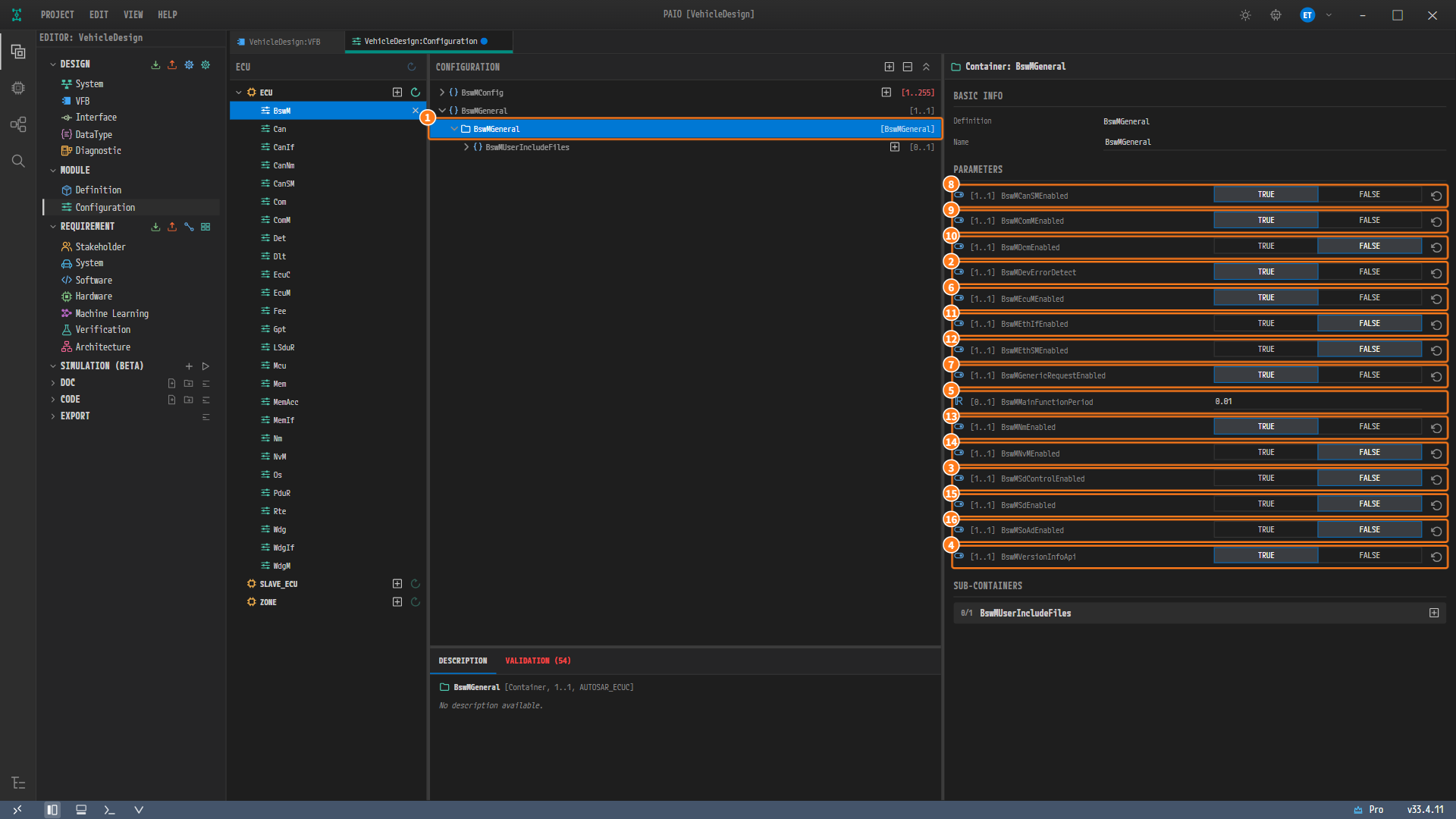
Figure 6-9. ①
BswMGeneral, ② to ⑯ its values. Click TRUE where the table says TRUE, type0.01in BswMMainFunctionPeriod and leave the others as they are. -
Add the containers of
BswMConfigin the order of the table. A rule names its expression and its action list; the action listAlRteStartcomes after the rule in the table, so type its path.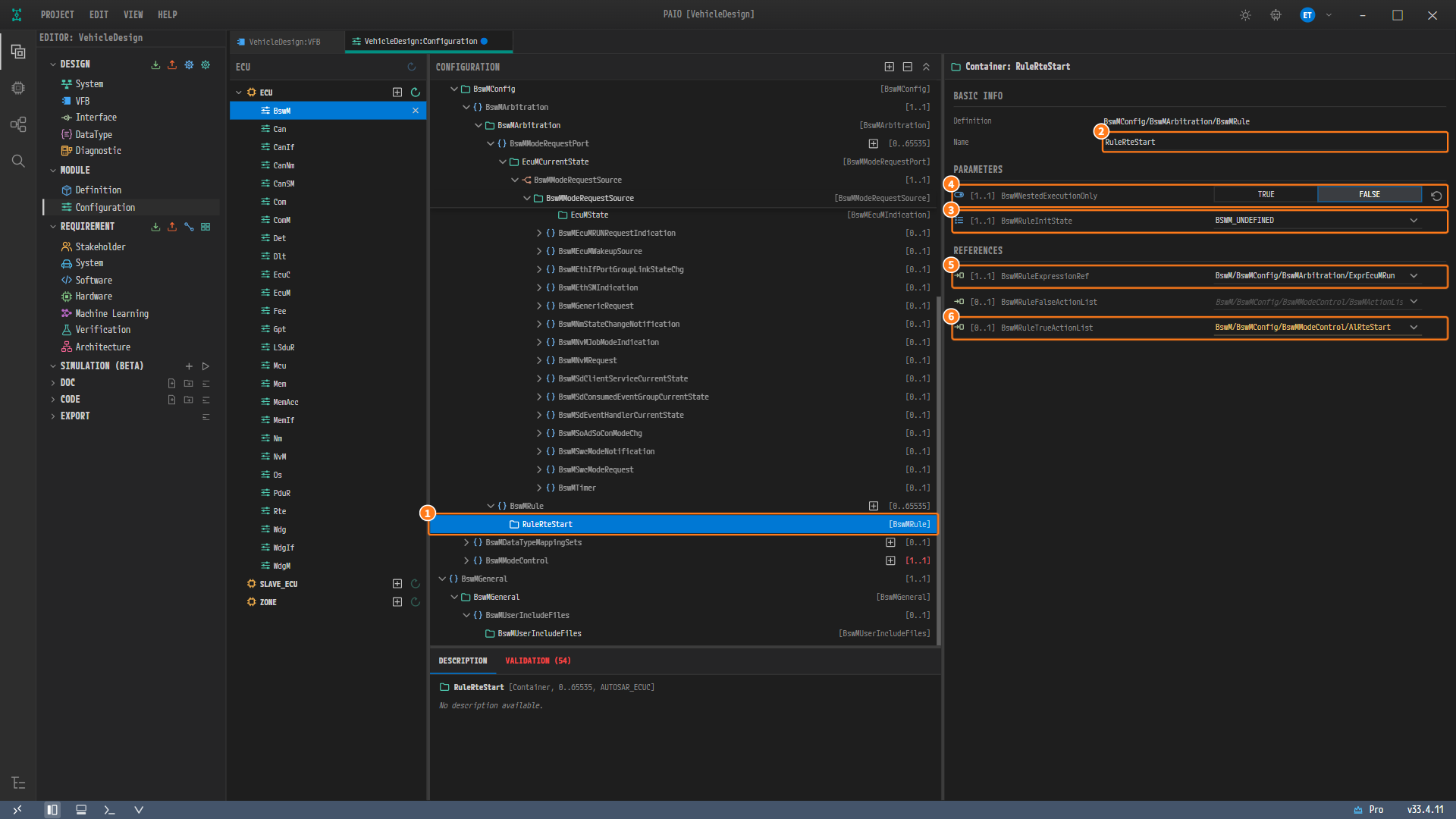
Figure 6-10. ①
RuleRteStart, ② Name, ③ BswMRuleInitState, ④ BswMNestedExecutionOnly, ⑤ BswMRuleExpressionRef, ⑥ BswMRuleTrueActionList. -
Save with
Ctrl+S.
| Container | + on | Values |
|---|---|---|
BswMGeneral | BswMGeneral | BswMDevErrorDetect TRUE, BswMVersionInfoApi TRUE, BswMMainFunctionPeriod 0.01, BswMEcuMEnabled TRUE, BswMGenericRequestEnabled TRUE, BswMCanSMEnabled TRUE, BswMComMEnabled TRUE, BswMNmEnabled TRUE |
BswMGeneral/BswMUserIncludeFiles | BswMUserIncludeFiles | BswMUserIncludeFile EcuM.h |
BswMConfig | BswMConfig | None |
BswMConfig/BswMArbitration | BswMArbitration | None |
BswMConfig/BswMArbitration/EcuMCurrentState | BswMModeRequestPort | BswMRequestProcessing BSWM_IMMEDIATE |
BswMConfig/BswMArbitration/EcuMCurrentState/BswMModeRequestSource | BswMModeRequestSource | None |
BswMConfig/BswMArbitration/EcuMCurrentState/BswMModeRequestSource/EcuMState | BswMEcuMIndication | None |
BswMConfig/BswMArbitration/CondEcuMStateRun | BswMModeCondition | BswMConditionType BSWM_EQUALS, BswMConditionMode BswM/BswMConfig/BswMArbitration/EcuMCurrentState |
BswMConfig/BswMArbitration/CondEcuMStateRun/BswMConditionValue | BswMConditionValue | None |
BswMConfig/BswMArbitration/CondEcuMStateRun/BswMConditionValue/Value | BswMBswMode | BswMBswRequestedMode ECUM_STATE_RUN |
BswMConfig/BswMArbitration/ExprEcuMRun | BswMLogicalExpression | BswMArgumentRef BswM/BswMConfig/BswMArbitration/CondEcuMStateRun |
BswMConfig/BswMArbitration/RuleRteStart | BswMRule | BswMRuleInitState BSWM_UNDEFINED, BswMRuleExpressionRef BswM/BswMConfig/BswMArbitration/ExprEcuMRun, BswMRuleTrueActionList BswM/BswMConfig/BswMModeControl/AlRteStart |
BswMConfig/BswMModeControl | BswMModeControl | None |
BswMConfig/BswMModeControl/RteStart | BswMAction | None |
BswMConfig/BswMModeControl/RteStart/BswMAvailableActions | BswMAvailableActions | None |
BswMConfig/BswMModeControl/RteStart/BswMAvailableActions/Kind | BswMRteStart | None |
BswMConfig/BswMModeControl/AlRteStart | BswMActionList | BswMActionListExecution BSWM_TRIGGER |
BswMConfig/BswMModeControl/AlRteStart/Item0 | BswMActionListItem | BswMActionListItemIndex 0, BswMAbortOnFail TRUE, BswMActionListItemRef BswM/BswMConfig/BswMModeControl/RteStart |
Setting Up Mcu and Det
-
Click
Mcuin the list and add its containers from the table.CoreClockis the clock the CAN driver refers to in chapter 9.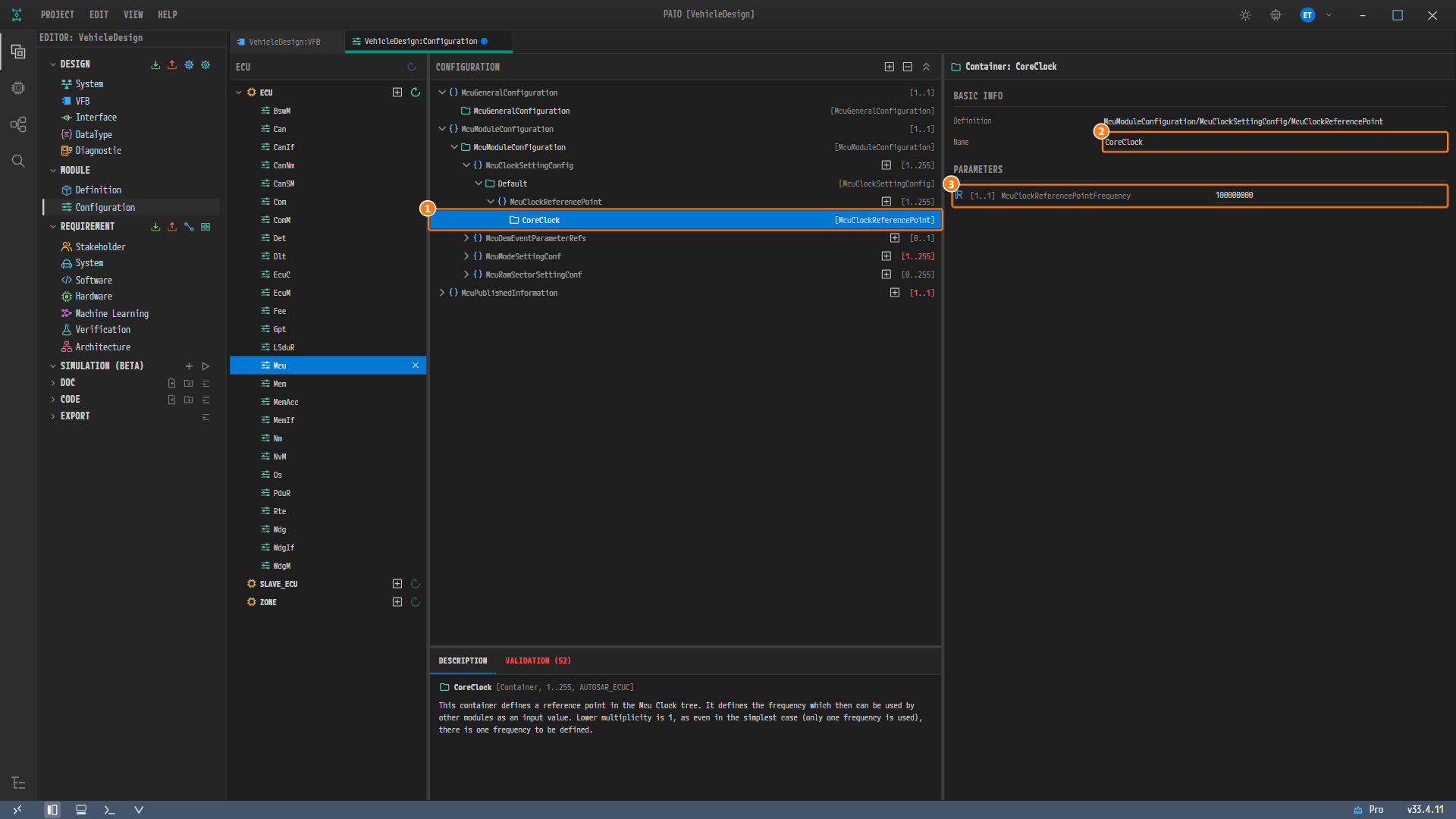
Figure 6-11. ①
CoreClock, ② Name, ③ McuClockReferencePointFrequency. -
Click
Detin the list and addDetGeneral. -
Save with
Ctrl+S.
| Container | + on | Values |
|---|---|---|
McuGeneralConfiguration | McuGeneralConfiguration | McuDevErrorDetect TRUE, McuGetRamStateApi TRUE, McuNoPll FALSE, McuPerformResetApi TRUE, McuVersionInfoApi TRUE |
McuModuleConfiguration | McuModuleConfiguration | McuClockSrcFailureNotification DISABLED, McuNumberOfMcuModes 2, McuRamSectors 1, McuResetSetting 1 |
McuModuleConfiguration/Default | McuClockSettingConfig | McuClockSettingId 0 |
McuModuleConfiguration/Default/CoreClock | McuClockReferencePoint | McuClockReferencePointFrequency 100000000 |
McuModuleConfiguration/Normal | McuModeSettingConf | McuMode 0, McuLowPowerMode FALSE |
McuModuleConfiguration/Sleep | McuModeSettingConf | McuMode 1, McuLowPowerMode TRUE |
McuModuleConfiguration/Sector0 | McuRamSectorSettingConf | McuRamDefaultValue 0, McuRamSectionBaseAddress 0, McuRamSectionSize 256 |
McuPublishedInformation | McuPublishedInformation | None |
McuPublishedInformation/PowerOn | McuResetReasonConf | McuResetReason 0 |
McuPublishedInformation/Software | McuResetReasonConf | McuResetReason 2 |
| Container | + on | Values |
|---|---|---|
DetGeneral | DetGeneral | DetVersionInfoApi TRUE |
Importing the Rte Values File
Six references of Rte cannot be entered in the property panel yet: their lists do not offer the target, and a typed path is not kept.
| Container | Reference | Target |
|---|---|---|
BswMInstance/RteEventToTaskMapping_0 | RteEventRef | The BswM poll event BswMPollTiming |
RteBswModuleInstance_0, _3, _4, _5, _6 (BswM, CanIf, CanSM, ComM, Com), each RteBswExclusiveAreaImpl_0 | RteBswExclusiveAreaRef | The module's BSW exclusive area |
The Rte values file brings these containers with their references. Importing Rte replaces its configuration whole, so the file also carries the SW-C type and instance pairs that PRTE Platform Import created; otherwise the import would remove them.
-
Click the Import icon in the DESIGN header of the EDITOR view.
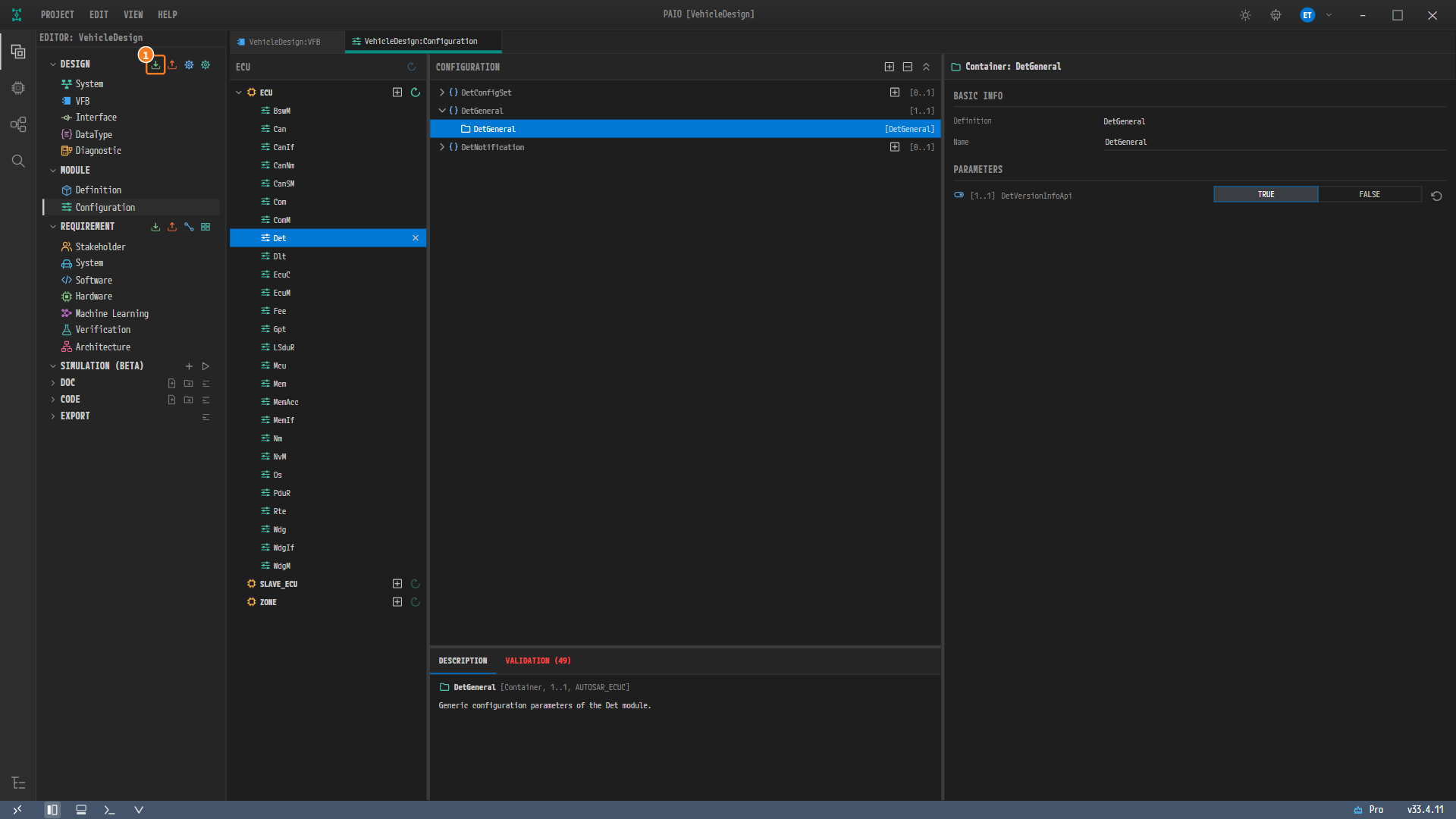
Figure 6-12. ① Import.
-
Choose the saved file
VehicleDesign_Rte.arxmlin the file dialog. The Conflict Resolution window opens withRte, the one module of the file. The button at the bottom right readsResolve 0/1. Click Module Definition on the left, then All → Use Imported. When the button readsResolve 1/1, click it.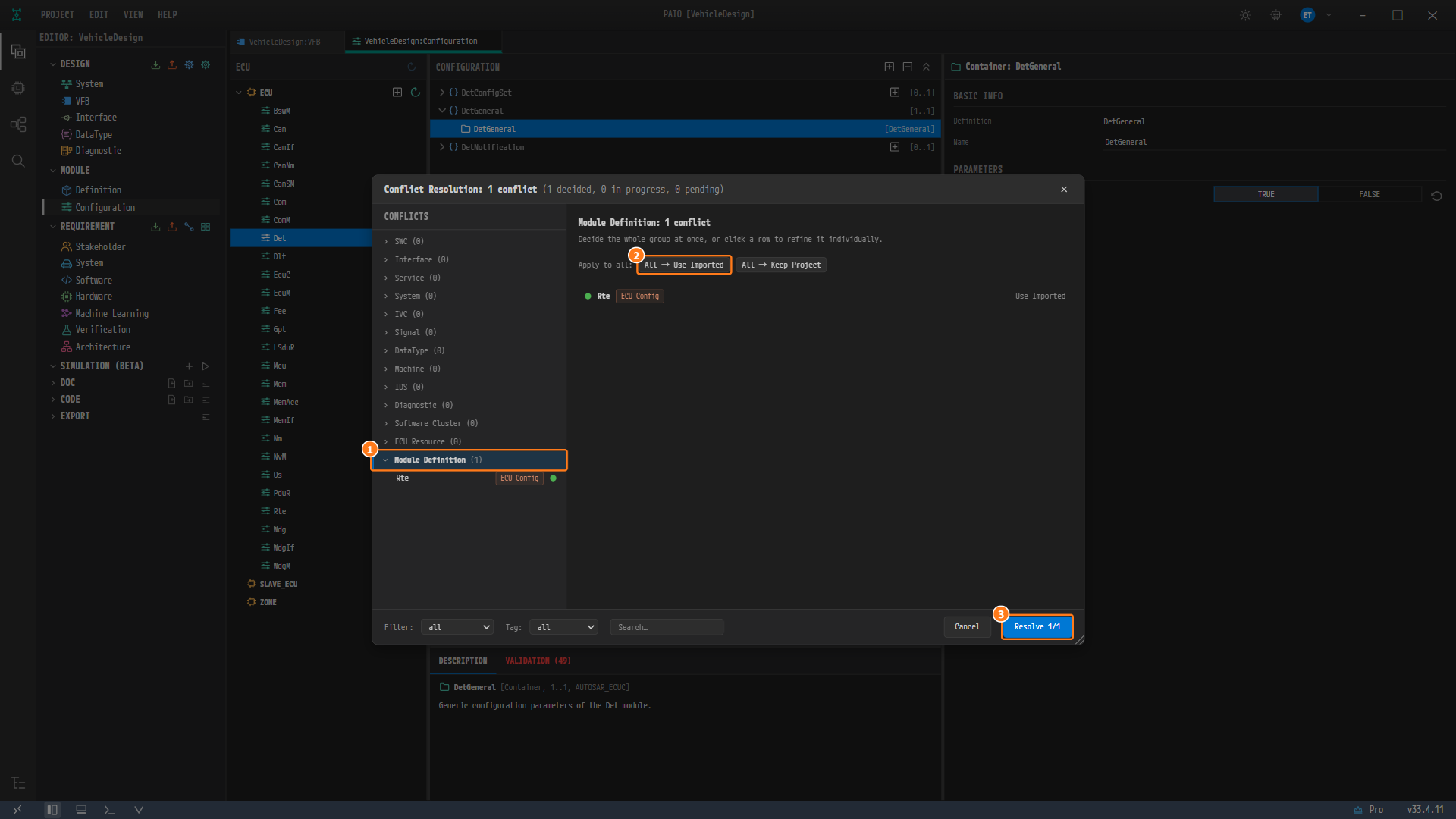
Figure 6-13. ① Module Definition, ② All → Use Imported, ③
Resolve 1/1.The message
Import completeappears at the bottom right, with1 replacedunder it. You complete theRtecontainers in chapter 8.
Why Is It Designed This Way?
- No AUTO CONFIGURATION. Every BSW value comes from you, so each one is visible in the editor. Configured this way from an empty project, validation reports no issues and PRTE generates the code of 15 modules with no errors.
- Platform Import is not configuration. It creates the module definitions, empty configurations and the BSW service components. It sets no BSW value.
- The five modules PRTE requires. PRTE needs the configuration of
Os,Rte,EcuM,BswMandMcuto generate code. If any one is empty, generation stops withMANDATORY_MODULE_MISSING. - The Rte values file is temporary. It holds only the six references the property panel does not offer yet, and the SW-C pairs the import would otherwise remove. Once the panel offers those targets, you enter the references in chapter 8 like every other value.
- Network management at start-up. BswMNmEnabled and the items
CanNmInitandNmInitserve the start-up of network management at run time; PRTE does not require them to generate code.CanNmandNmneed no exclusive area reference: neither has a BSW exclusive area that PRTE requires.
Checklist
- The composition
PRTE_ECUis inside the frame. -
EcuMshowsEcuMConfiguration,EcuMFlexGeneralandEcuMGeneral, andEcuMDriverInitListOneholds the eleven items fromMcuInittoCanSMInit. -
BswMholdsRuleRteStartandAlRteStart. - The message
Import completewith1 replacedappeared. - The tab
VehicleDesign:Configurationcarries no modified mark.
Next Step
In Os Configuration you create the tasks, alarms and counter of Os by hand.